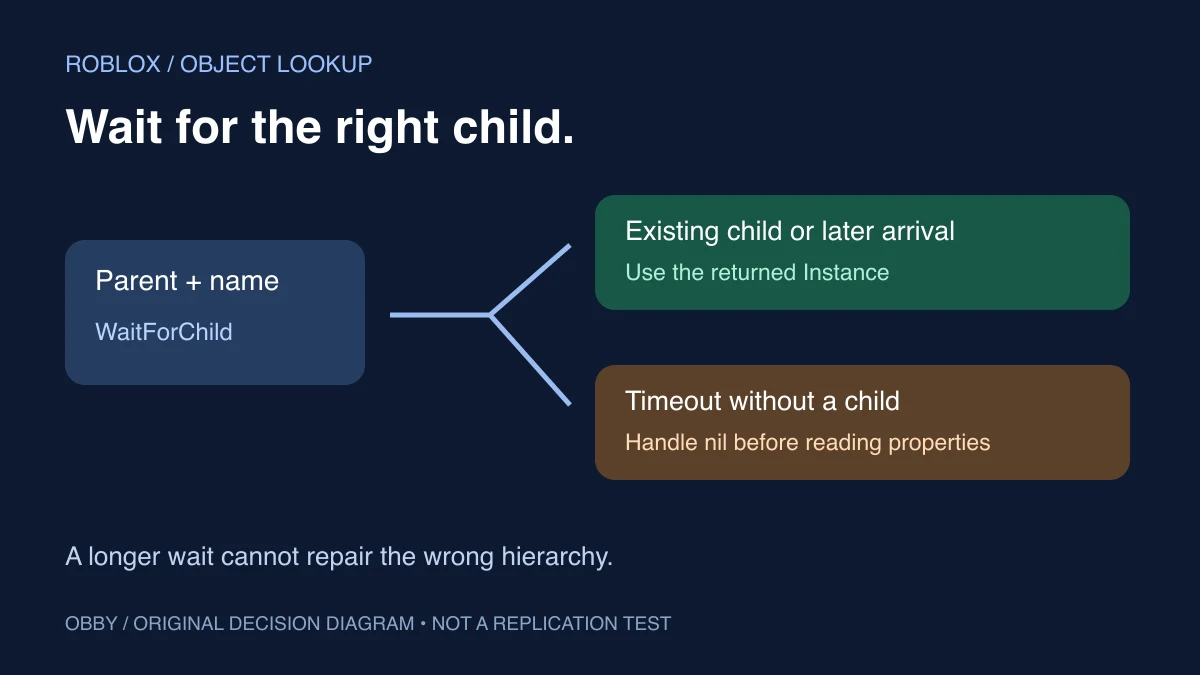
WaitForChild retrieves a named child, waiting when that child is not yet present. It is useful when your code expects an object to arrive, but waiting cannot fix an incorrect parent or a misspelled name. Decide what the script should do if the object never appears before chaining more operations onto the result.
WaitForChild versus FindFirstChild
The Instance reference documents a child name and an optional timeout. An existing child is returned without yielding; otherwise the current thread waits. With a timeout, a missing child can produce nil. FindFirstChild checks for a match without waiting.
| Situation | Useful approach | Caller responsibility |
|---|---|---|
| Optional child may be absent | FindFirstChild | Continue without it or show an alternative |
| Child is expected to arrive | WaitForChild with a chosen timeout | Handle the missing result |
| You created the child yourself | Keep the returned reference | Track its intended lifetime |
| You need many changing members | A discovery and lifecycle design | Subscribe and clean up deliberately |
Use a wait for an expected dependency, rather than adding waits everywhere because they seem safer. An optional decoration should not hold an entire controller open while it waits for an object that your design allows to be absent.
Run a complete existing, late, and missing-child exercise
Insert a regular Script in ServerScriptService in a separate practice place. Open Output and run it. The script creates and later destroys its own folder, so it does not depend on objects with special names already being in your place.
local root = Instance.new("Folder")
root.Name = "WaitPractice"
root.Parent = workspace

local ready = Instance.new("Folder")
ready.Name = "Ready"
ready.Parent = root

local existing = root:WaitForChild("Ready", 2)
print("Existing child matches:", existing == ready)

local finished = false
task.delay(0.25, function()
    if finished then return end
    local late = Instance.new("Folder")
    late.Name = "Late"
    late.Parent = root
end)

print("Late is absent now:", root:FindFirstChild("Late") == nil)
local later = root:WaitForChild("Late", 2)
if later then
    print("Wait returned:", later.Name)
else
    warn("Late did not arrive within the practice timeout")
end

local missing = root:WaitForChild("NeverCreated", 0.25)
if missing then
    print("Unexpected child:", missing.Name)
else
    print("Missing child: timeout handled")
end

finished = true
root:Destroy()
In the intended run, the existing-child check is true, the immediate Late check says it is absent, and the wait then returns Late. The NeverCreated lookup takes the handled-timeout branch because this script never creates that child. The temporary folder is destroyed at the end.
The scheduled delay and timeout values are teaching inputs, not measured guarantees about exact elapsed time. The code includes a branch if the delayed child does not arrive within the selected wait. It has been documentation-reviewed but has not been executed here in Roblox Studio.
Check the parent before changing the timeout
WaitForChild looks for a child of the Instance on which you call it. If Explorer shows Workspace.Map.Switch, waiting for Switch directly on Workspace does not describe that hierarchy. First retrieve the Map reference, verify the result if its lookup can time out, and then look for Switch under that object.
Print the parent’s full name while debugging and compare it with Explorer. Two folders can contain children with identical names. Finding a name somewhere in the place does not prove it is a child of the parent your script is using.
FindFirstChild has a recursive option, as listed in the Instance reference. Do not assume that changes WaitForChild into a recursive lookup, and do not use a broad recursive search to hide uncertainty about which object the controller should own.
A timeout is a branch in your logic
Give the missing result a deliberate meaning. A required dependency might cause this controller to report the problem and stop. An optional element might be skipped. A loading screen might show a retry action. The correct behavior depends on the feature; simply replacing every missing result with another wait can leave the user with no explanation.
For example, do not immediately read result.Name after a timeout unless you have checked the result. A nil check belongs before the operation that needs a real Instance. The complete exercise uses separate success and missing branches to keep that dependency visible.
An “infinite yield possible” warning is a reason to inspect the lookup. It is not evidence that the missing child has been created, and it is not a substitute for an explicit timeout result. Check the path and initialization flow before increasing a duration.
Object availability and initialized state are different
Roblox’s replication-order guide explains that server-to-client object and property replication order is not generally guaranteed. Retrieving an object reference is therefore a different question from knowing that every value you intend to read has reached its required state.
If a feature depends on a named attribute or a later state transition, establish and observe that contract separately. The attributes guide includes an initial read and an observer for later changes. Avoid assuming that one successful child lookup completes every initialization step in the game.
The practice script is server-only and uses a delayed local creation to demonstrate waiting. It does not test replication, streaming, or delivery order across clients. Test the actual client path in your place before relying on it for UI or gameplay setup.
Do not substitute an arbitrary task.wait for a dependency
A fixed pause says how long to suspend a sequence, not which object it needs. If the object is still absent afterward, the next line still has a missing dependency. Conversely, if it was already present, the pause added delay without establishing anything new.
The task-library comparison explains the scheduling methods used by the exercise. The delayed callback creates Late independently while the caller waits for that specific child. Its finished guard prevents an overdue teaching callback from adding to the temporary container after the exercise has ended.
Keep references and lifetimes understandable
Once the script has the right object, keep that reference for the work that owns it. Repeatedly searching by name is not a lifecycle strategy. Decide what happens if the object is replaced or destroyed, and release any observers or other resources when your controller stops.
For reusable helpers, the ModuleScript exercise shows an explicit sibling lookup before require. For a changing group of objects, see CollectionService. Use Studio script search to locate duplicate creators and consumers. Documentation checked November 8, 2026.