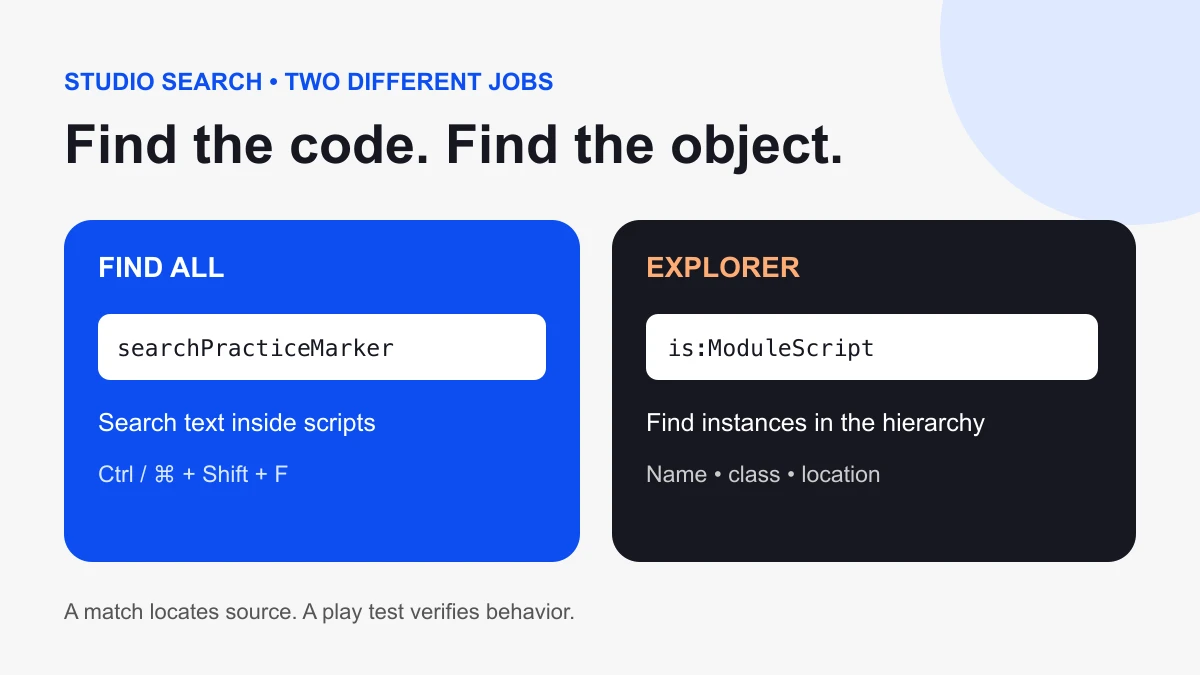
To search code across your Roblox Studio project, open Find All / Replace All with Ctrl + Shift + F on Windows or ⌘ + Shift + F on Mac. To find script objects by type or name, use Explorer. Choose the tool based on whether you remember a line of code or an object.
Choose the right search
| You remember | Use | Starting query |
|---|---|---|
| Text inside code | Find All | A distinctive variable or function name |
| The script’s object name | Explorer search | The name, such as CoinCollector |
| Only the object type | Explorer class search | is:ModuleScript |
| Text in the open script only | Find | Ctrl + F / ⌘ + F |
Find a line of code across scripts
- Open the place you want to inspect.
- Open Find All with the platform shortcut above.
- Enter a distinctive identifier or phrase.
- Open a matching result and read the surrounding function.
- Check the script’s location and context before deciding to edit it.
Find All searches code across multiple scripts; ordinary Find searches the open script. Roblox documents both in its Script Editor guide.
Find script objects in Explorer
Explorer’s search accepts names and class queries. Try is:Script, is:LocalScript, and is:ModuleScript separately to inspect each category. A plain search for script matches names, so it can also show containers such as ServerScriptService. See the official Explorer search reference.
Use the filtered hierarchy to answer a second question: where does this object live? A result beneath a Part has a different Parent from a Script in ServerScriptService. Two objects with the same name can serve completely different mechanics. Open both before assuming one is a duplicate.
Practice with a marker you control
Create a disposable practice place or save a copy of your project. Add one Script called SearchPractice in ServerScriptService and enter:
local searchPracticeMarker = "blue-lantern"
print(searchPracticeMarker)
Before running anything, search for searchPracticeMarker using Find All. You should recognize the definition and its use in the same small example. Then search Explorer for SearchPractice. The first exercise locates code text; the second locates the object that holds it.
Now change only the string to "green-lantern". Search for the old string and then the new one. This gives you a small, predictable way to practice tracing edits before trying a large project. Remove the practice object when you finish or keep it in the disposable copy.
Trace a real mechanic without guessing
Suppose a coin awards the wrong amount. Start with a distinctive name from the mechanic rather than a broad word such as local. Record the matching script path, the function that changes the balance, and the caller that triggers it. Read both the award and any later reset. A matching line proves the text is present; it does not prove that line runs during your test.
If several results look relevant, write a short inspection note for each: “creates the value,” “increments it,” or “resets it on respawn.” This keeps a code search from turning into an accidental edit of the first result.
When search returns nothing
- Wrong scope: verify you used Find All rather than Find in one open script.
- Wrong kind of query: an object name may be absent from its source code. Try Explorer.
- Different spelling: search a shorter distinctive fragment and check capitalization.
- Different place: confirm the open project is the one containing the mechanic.
- Runtime behavior: generated objects or indirect calls may require a play test and Output inspection after the static search.
Make one targeted change, then test
Save a backup before a broad edit. Change one understood location, repeat the search to inspect related references, and run the mechanic’s test. A shared identifier can appear in unrelated scripts, strings, or comments; do not treat every match as a replacement candidate.
For the next step, use our Roblox scripting tutorial to learn object references and events, or follow the Studio saving guide before changing a larger project. Sources checked October 6, 2026; keyboard mappings can differ if you customize Studio.