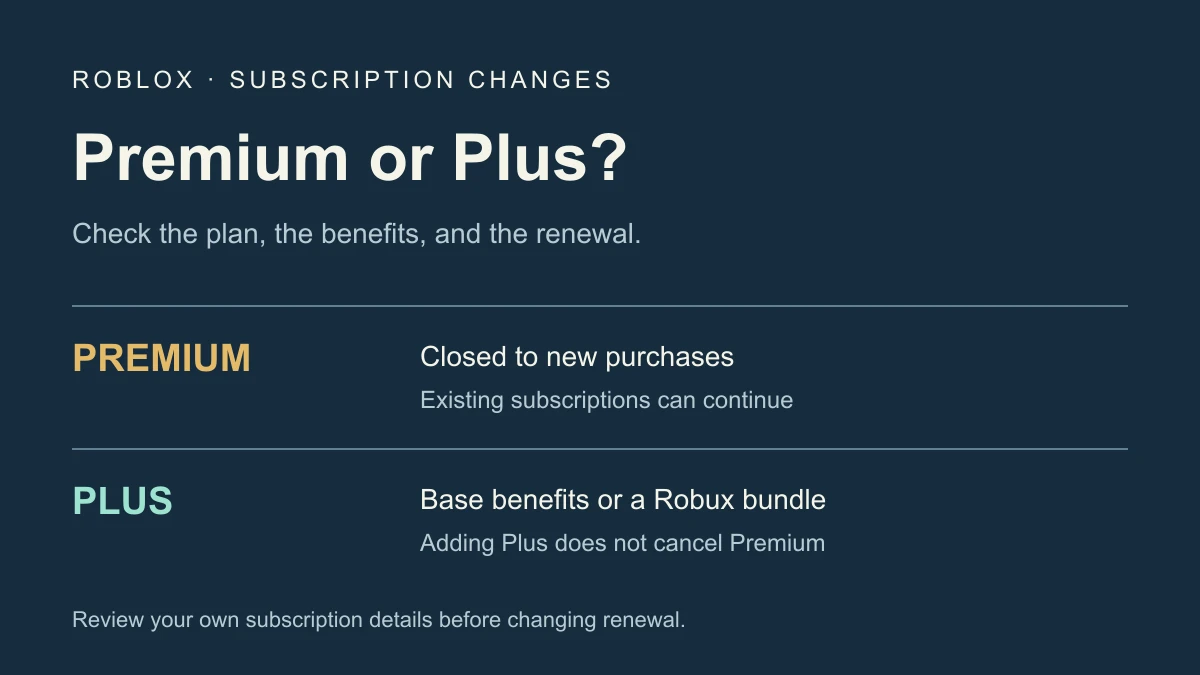
Roblox Premium is no longer sold to new subscribers, but existing subscriptions can continue. Roblox stopped new Premium purchases on April 30, 2026, when Roblox Plus launched. If you still pay for Premium, that does not automatically mean your membership has disappeared or been replaced by Plus.
Is Roblox Premium gone?
Roblox’s Plus launch announcement separates two changes: new Premium sign-ups ended, while existing Premium members could continue their membership. That distinction explains why one player cannot find Premium for sale while another still has an active renewal.
The Premium support page adds an important consequence: if an existing member cancels, they cannot resubscribe to Premium. Review that condition before confirming cancellation. A general app-store Resubscribe feature does not establish that this discontinued plan is available again.
What Roblox Premium benefits remain?
Existing members retain a monthly Robux stipend based on their plan and access to trading and reselling. Premium 1000 and 2200 retain avatar-item publishing and keeping items on sale. Roblox removed the Premium logo and ended the 10% bonus on additional Robux purchases on May 30, 2026.
The official transition announcement describes the stipend and benefit changes; the Premium support page specifies the publishing-plan tiers. An older screenshot showing the logo or extra purchase bonus is not a reliable description of today’s membership.
Roblox Plus vs Premium
| Question | Existing Premium | Roblox Plus |
|---|---|---|
| New purchase available? | No new Premium purchases | Current subscription offering, subject to platform and region availability |
| Monthly Robux? | Stipend based on the existing plan | Base Plus has none; optional Plus bundles include monthly Robux |
| Purchase benefit? | Former 10% extra-Robux bonus ended | Discounts on eligible purchases, with exclusions |
| Private servers? | Not a Premium benefit in this comparison | One free private server per supported game under the current benefit |
| Can both be active? | Yes; inspect each subscription and renewal separately | |
The Plus support article distinguishes benefits-only Plus from the optional Plus 500, 1000, and 2000 bundles. The bundle’s name matters: buying base Plus is not the same as buying a monthly Robux allowance.
Roblox’s current Plus overview describes 10% off eligible purchases during the first two months and 20% starting in month three. It also confirms one free private server per game. This is more precise than repeating the original launch wording about unlimited private servers.
Check the offer shown to your account for price, currency, renewal, and included Robux. Discounts have exclusions; the support article lists categories such as resold items and avatar publishing fees. Do not assume every purchase receives the headline discount.
Can Premium and Plus both charge me?
Yes. The Plus support article explicitly says both subscriptions can be active at once. Adding Plus does not establish that Premium stopped renewing. Open the subscription details and identify each plan separately, including any app-store subscription attached to it.
A practical review is to compare three facts: the exact plan name, who bills it, and its next renewal or expiration date. Compare those against the receipt rather than inferring the plan from an avatar badge. The visible profile appearance does not replace billing records.
How to cancel Roblox Premium
First identify where the subscription was purchased. The correct cancellation route follows the billing provider, not simply the device you happen to be using today. These are instructions to review and carry out yourself; no account cancellation was performed for this guide.
- Roblox web or desktop purchase: open Settings, then Subscriptions. Find Premium, select Cancel Renewal, and follow the confirmation prompts described in Roblox’s cancellation instructions.
- Apple-billed purchase: on iPhone, open Settings, tap your name, then Subscriptions. Select Roblox and follow the cancellation option. Apple’s guide also explains finding the correct Apple Account from the receipt.
- Google Play purchase: open subscriptions in Google Play using the Google Account that owns the purchase. Select the subscription, choose Cancel subscription, and follow the instructions in Google’s subscription guide.
Google explicitly notes that uninstalling an app does not cancel a subscription. If a plan is missing, confirm the purchasing account and receipt before repeating the same steps on another device. Check the final renewal or expiration status instead of treating a button click alone as completion.
What if there is no Cancel Renewal button?
The Premium support page lists several possible explanations: the plan may already be ending, may be in the renewal process, may be a nonrecurring Windows/Amazon membership, or may require management through the mobile app store. That is a billing-state question, not evidence that another paid plan must be purchased.
If you cannot access the Roblox account, use the support route linked from the official membership article. If Apple or Google bills the subscription, use that provider’s account-specific help. Cancellation, expiration, and a refund request are different outcomes; check the applicable provider’s policy rather than assuming one implies the others.
Keep membership separate from your creator project
A player subscription, avatar-item publishing eligibility, and monetizing a game are different questions. For item publishing costs, read the UGC upload-cost guide. For a private play session, see the private-server guide. Check each workflow’s current requirements instead of treating a subscription as universal access.
Sources reviewed November 17, 2026. This guide is based on official plan and billing documentation; purchases, account renewals, cancellation, and refunds were not executed or tested.