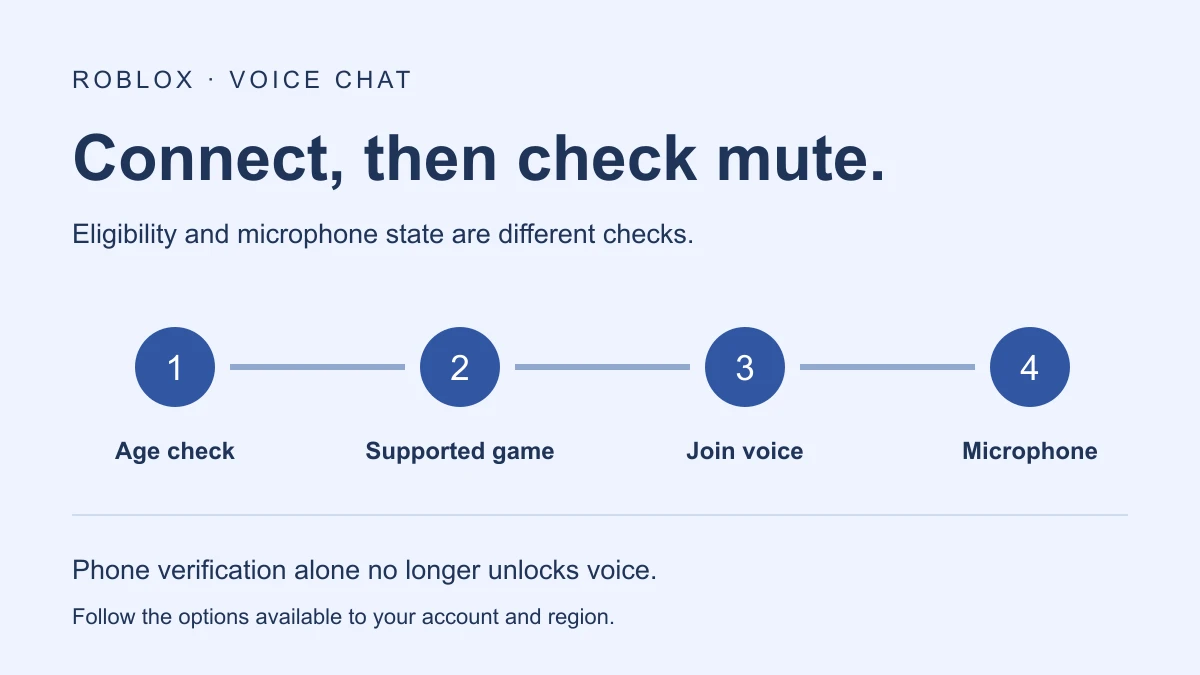
To turn on Roblox voice chat, an eligible user must be age checked as 13 or older, join an experience that supports voice, and connect using its headphone icon or in-experience Voice Chat setting. Phone verification alone is no longer a valid way to unlock voice access. Availability also depends on region and the account’s applicable controls.
Check eligibility before looking for a toggle
Roblox’s current voice activation instructions describe access for eligible, age-checked 13+ users in supported experiences. They identify ID verification and facial age estimation as age-check methods, while noting that methods and voice availability can vary by account or region.
Use the options Roblox actually presents to your account. The age-check guide explains the methods, possible regional parental-consent requirements, and what to do if an age estimate is incorrect. A typed birthday or verified phone number is not the same as a completed age check.
If the feature is unavailable for your age group or account, changing microphone settings will not create eligibility. Use Roblox’s official account and support flows for an incorrect age result rather than instructions that promise a bypass.
How to turn on voice chat in Roblox
- Complete the available age-check flow. Follow Roblox’s own prompts and confirm your account’s result.
- Choose a voice-supported experience. Check its description and available controls instead of assuming every game includes voice.
- Connect to voice. Use the headphone icon where shown, or open in-experience settings and use the Voice Chat control.
- Check the microphone state. Connecting to voice does not necessarily mean your microphone is unmuted.
- Confirm the intended audio path. Check your device’s microphone mute state and the input/output settings available in the experience.
Roblox’s chat help article confirms that chat access requires an age check and may have regional restrictions. Its voice section describes the headphone connection control and in-game toggle. Follow those current controls rather than an older tutorial that assumes one permanent account-settings switch.
How to use voice chat on Roblox mobile
The Voice FAQ lists mobile among supported platforms. The same eligibility and experience-support checks still apply. In a supported mobile experience, look for the voice connection controls, then check microphone mute state separately.
A useful troubleshooting sequence is to identify what you can actually see: no voice control, a disconnected control, a connected-but-muted microphone, or a connected microphone with an audio problem. Those observations lead to different checks. Do not repeatedly redo account verification merely because a device microphone is muted.
This guide follows Roblox’s published instructions. It does not claim that every phone or account has identical controls, or that an account verification and live voice conversation were completed for this article.
Voice chat gone or not showing: what to check
| What you observe | First check |
|---|---|
| No voice option in one game | Confirm that the experience supports voice. |
| No voice option across supported games | Review age-check status, regional availability, account controls, and any moderation notice. |
| Only a phone number is verified | Follow the current age-check instructions; phone verification alone does not unlock voice. |
| Voice control says disconnected | Use the connection control or in-experience toggle. |
| Connected, but microphone is muted | Check microphone controls in the experience and on the device. |
| Connected and unmuted, but audio is wrong | Inspect the available input/output selections and device audio path. |
A missing control does not, by itself, prove Roblox removed voice chat for everyone. The current activation article notes regional availability and possible moderation restrictions. Check your own account notice before assuming a microphone issue or platform-wide removal.
Roblox’s age-check guide also says a discrepancy can lead to another age-check prompt. If your situation is an account eligibility change, use that guide to understand the official next step. A new headset cannot resolve an account-level requirement.
How to turn off voice chat in Roblox
Open in-experience settings and change Voice Chat from connected to disconnected. The Voice FAQ documents this disconnect flow. If you only want to stop transmitting temporarily, use microphone mute instead; disconnecting from voice and muting your microphone serve different purposes.
To silence a particular participant, Roblox documents a speaker-icon mute control. That session mute is separate from blocking or reporting someone. Use the official Voice FAQ for those controls and for information about voice data and moderation.
Playing with friends does not override voice eligibility
Choosing the same server helps your group meet in one experience, but it does not remove the age, region, or communication requirements for voice. For server setup, use the separate private-server guide. For activity ideas, see Roblox games to play with friends; verify voice support for the actual experience you choose.
For creators, enabling voice in an experience is a separate development task from a player connecting to it. Do not treat the player steps above as Studio configuration instructions.
Official instructions reviewed November 17, 2026. Account controls, region availability, and interface labels may change; the linked Roblox support pages are the reference for current account-specific steps.
Choosing an account identity first? Use the Roblox username generator for themed or four-letter ideas, then check the name in Roblox.