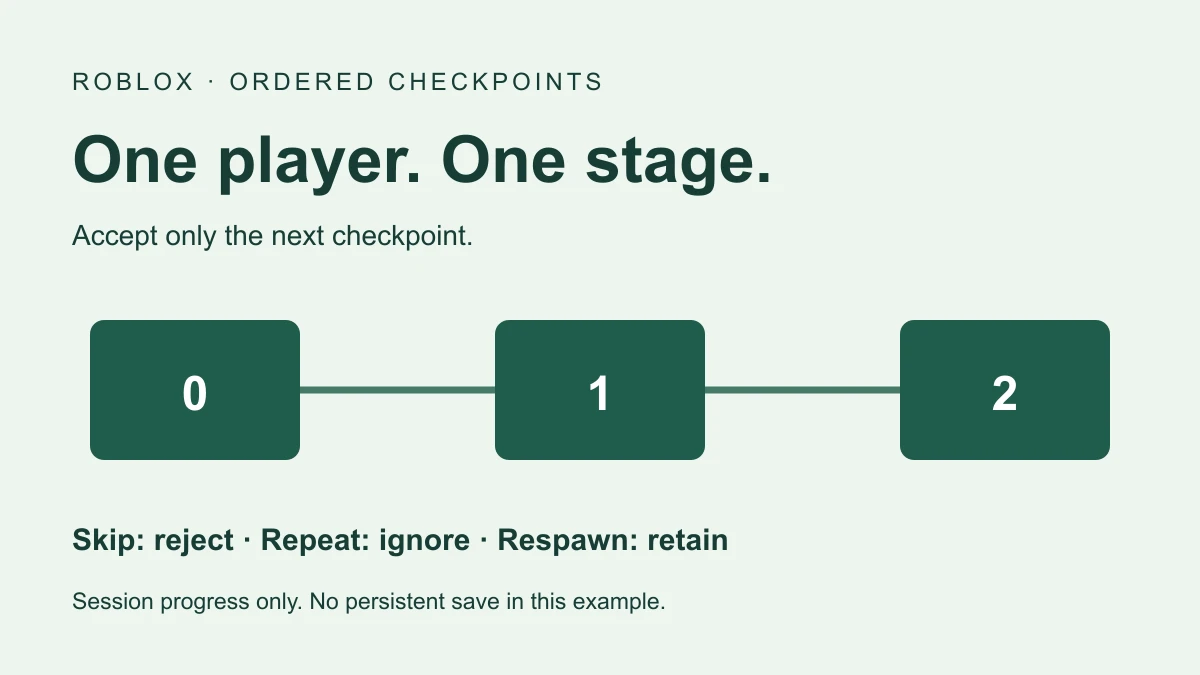
A Roblox checkpoint script needs to track each player’s reached stage and set their next respawn target. The example below adds an ordering rule: stage 1 must be accepted before stage 2. Touching an older pad does not move progress backward, and touching the same pad repeatedly does not award the stage again.
What the checkpoint example does
This exercise creates three enabled, neutral SpawnLocations at x=0, 24, and 48. Each Player has a separate server-side stage entry. Accepted contact changes that entry, the Player’s RespawnLocation, and a PracticeCheckpointStage attribute you can inspect during a test.
The spawn location guide covers the basic pad and future-spawn relationship. This guide adds ordered progression and explicit skip/repeat/backtrack rules. It does not add persistent saves, a leaderboard, stage purchases, or obstacle-completion validation.
Set up a small practice course
- Use a spare place with a supporting floor spanning x=0 through x=48 and space above the pads.
- Add one regular Script in ServerScriptService and paste the full example below.
- Keep other checkpoint and respawn-target scripts out of this exercise so one system owns the Player’s RespawnLocation.
- Start a play test and inspect the created OrderedCheckpointPractice folder and your Player’s attributes.
The script leaves existing spawns alone. Its assigned target controls the next eligible respawn; it does not relocate an already-present character. If the Script starts after your character exists, inspect the target and use a normal reset to begin at the assigned start. The example has been reviewed against documentation but has not been executed in Studio for this guide.
Copy the ordered checkpoint script
-- Regular Script in ServerScriptService, in a spare place with a floor.
-- Documentation-reviewed; not executed in Studio for this guide.
local Players = game:GetService("Players")
if workspace:FindFirstChild("OrderedCheckpointPractice") then
    warn("Use only one checkpoint practice Script")
    return
end
local folder = Instance.new("Folder")
folder.Name = "OrderedCheckpointPractice"
folder.Parent = workspace
local pads = {}
local stages = {} -- Server-owned session progress, keyed by Player.

for stage = 0, 2 do
    local pad = Instance.new("SpawnLocation")
    pad.Name = "Stage" .. stage
    pad.Size = Vector3.new(8, 1, 8)
    pad.Position = Vector3.new(stage * 24, 1, 0)
    pad.Anchored = true
    pad.Enabled = true
    pad.Neutral = true
    pad.AllowTeamChangeOnTouch = false
    pad.CanTouch = true
    pad.Color = stage == 0 and Color3.fromRGB(60, 130, 220)
        or Color3.fromRGB(60, 180, 120)
    pad.Parent = folder
    pads[stage] = pad
end

local function setup(player)
    if player.Parent ~= Players or stages[player] ~= nil then return end
    stages[player] = 0
    player.RespawnLocation = pads[0]
    player:SetAttribute("PracticeCheckpointStage", 0)
end
Players.PlayerAdded:Connect(setup)
Players.PlayerRemoving:Connect(function(player)
    stages[player] = nil
end)
for _, player in Players:GetPlayers() do setup(player) end

for stage = 1, 2 do
    local nextStage = stage
    local pad = pads[nextStage]
    pad.Touched:Connect(function(hit)
        local character = hit:FindFirstAncestorOfClass("Model")
        local player = character and Players:GetPlayerFromCharacter(character)
        local humanoid = character and character:FindFirstChildOfClass("Humanoid")
        if not player or player.Character ~= character then return end
        if not humanoid or humanoid.Health <= 0 then return end
        local current = stages[player]
        if current == nil or nextStage ~= current + 1 then return end

        -- No yield between the order check and the state update.
        stages[player] = nextStage
        player.RespawnLocation = pad
        player:SetAttribute("PracticeCheckpointStage", nextStage)
        print("Checkpoint accepted", player.Name, nextStage)
    end)
end
The attribute is an observable copy of the session stage. The progression decision reads the server’s stages table, not a value supplied by a client. At stage zero, a stage-two touch fails because 2 is not 0 + 1. Once stage one is accepted, the same stage-two contact can pass.
The order check and state update contain no yield. Repeated body-part contacts see the updated current stage and return. A single global debounce would be the wrong ownership here: one player touching a pad should not temporarily block every other player from progressing.
Check respawn eligibility separately
The Player.RespawnLocation reference requires a target under Workspace that is neutral or matches the player’s TeamColor. The example uses neutral pads so its rules do not depend on team membership.
The SpawnLocation documentation explains that multiple eligible pads can otherwise be chosen randomly. Keep the intended per-player reference in view when diagnosing an unexpected spawn. Also inspect Enabled, physical clearance, and other code that can replace the reference.
Test skips, repeats, backtracking, and two players
| Current stage | Contact | Expected result |
|---|---|---|
| 0 | Stage2 | Ignored; stage remains 0 |
| 0 | Stage1 | Stage becomes 1; target Stage1 |
| 1 | Stage1 again | Ignored; stage remains 1 |
| 1 | Stage2 | Stage becomes 2; target Stage2 |
| 2 | Stage1 | Ignored; stage remains 2 |
| 2 | Normal respawn | Same Player retains stage 2 and target Stage2 |
In a two-client Studio test, advance player A to stage two while player B remains at stage zero. Inspect both Players’ target references and PracticeCheckpointStage attributes. Reset each character and observe the actual spawn. The table describes intended results, not a captured multiplayer run.
Use physical walking contact for the touch checks. Roblox’s Touched reference distinguishes physical contact from simply changing a part’s CFrame into overlap. Check CanTouch and collision-group touch settings if your scene does not produce the expected event.
Session progress is not a saved checkpoint
Death replaces the character while this table remains associated with its Player. Leaving the server removes that Player’s table entry. A later join starts at zero. There is no DataStore request in the code, and publishing the place does not turn this table into durable storage.
If you later add saving, design load failure handling and stage validation before restoring a target. A displayed stage number alone is not persistence; the leaderstats guide separates display from saving. Avoid awarding valuable rewards from this introductory touch handler.
Keep the progression claim precise
The script checks ordered pad contacts from the current living player character. It does not prove that the player traversed an obstacle legitimately, prevent altered movement, or validate the time taken between pads. Add rules appropriate to your actual course before using progression for competitive results or paid rewards.
For debugging, use Find All to locate other RespawnLocation writers. Keep pad appearance separate from personal progress: changing a shared pad’s color would be visible to everyone, so this example uses a Player attribute instead of claiming a global color is individual feedback.
Documentation reviewed November 17, 2026. Studio respawn, contact, and multiplayer execution remain to be tested in your place.