A Roblox ModuleScript packages reusable code behind a returned value. Another script loads it with require, then calls the functions or reads the data it exposes. Start with one small module and one caller so you can see the dependency clearly before splitting a whole game into files.
What a ModuleScript returns
The ModuleScript reference shows a module returning one value and a caller retrieving it with require. A table is useful when you want a named collection of functions. A function defined only as a local inside the module is not automatically part of that returned API.
Think about the interface before moving code. A counter needs operations such as “read” and “increment”; the caller does not need to know how the count is stored. Keeping that boundary small makes it easier to change implementation without changing every consumer.
Create these two objects in Studio
| Parent | Object type | Exact name | Role |
|---|---|---|---|
| ServerScriptService | ModuleScript | PracticeCounter | Returns the counter constructor |
| ServerScriptService | Script | CounterPractice | Requires the module and prints results |
Use a separate practice place and keep the two objects as direct siblings. Put the module code below into PracticeCounter and the caller code into CounterPractice. Open Output and start a play test. No pre-existing Parts, player data, or external module assets are required.
ModuleScript: return a small constructor API
local PracticeCounter = {}

function PracticeCounter.new()
    local value = 0
    local counter = {}

    function counter.read()
        return value
    end

    function counter.increment()
        value += 1
        return value
    end

    return counter
end

return PracticeCounter
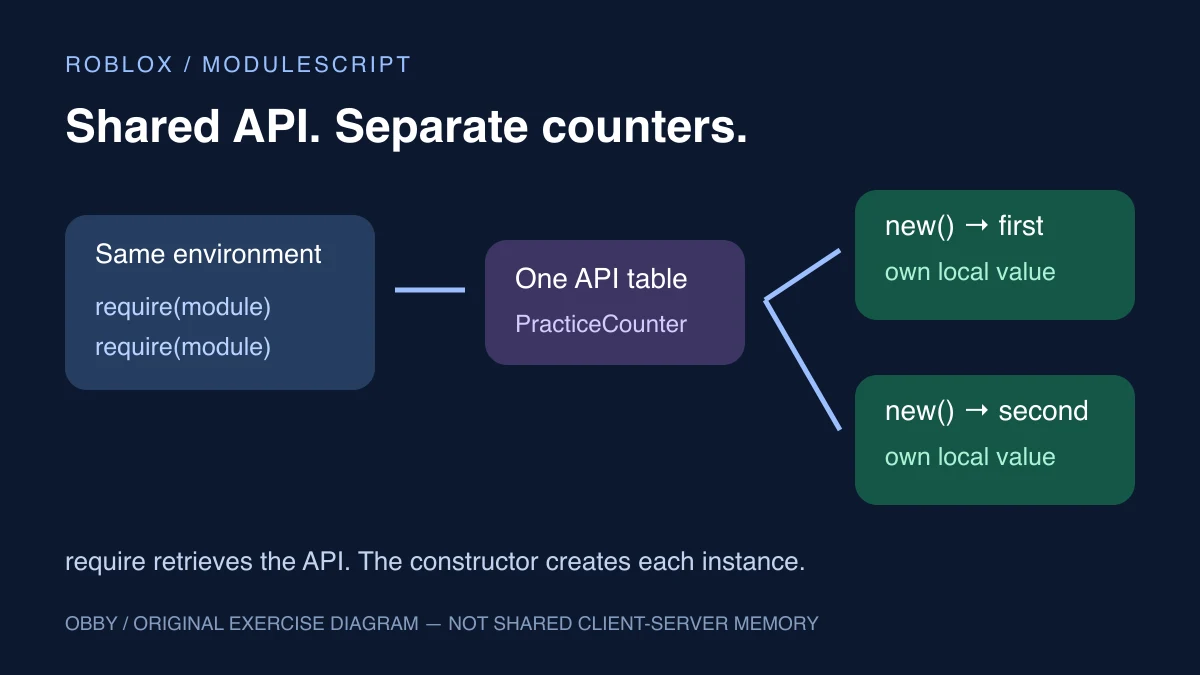
PracticeCounter.new is the exposed constructor. Each call creates a new local value and a new counter table whose functions use that value. The module returns PracticeCounter, while new returns one counter. Those are two different return points with different responsibilities.
The example uses dot calls consistently. Its functions capture the local value and do not use a self parameter. Follow the API’s calling convention when adapting other code; do not switch between dot and colon notation without understanding the parameters expected by that API.
Script: require the module and create two counters
local moduleObject = script.Parent:WaitForChild("PracticeCounter")
local PracticeCounter = require(moduleObject)
local SameModule = require(moduleObject)

print("Same module reference:", PracticeCounter == SameModule)

local first = PracticeCounter.new()
local second = SameModule.new()

print("Initially:", first.read(), second.read())
first.increment()
first.increment()
print("After first changes:", first.read(), second.read())
second.increment()
print("After second changes:", first.read(), second.read())
The intended output values are:
Same module reference: true
Initially: 0 0
After first changes: 2 0
After second changes: 2 1
These are predicted values from the code, not a captured Studio run. The example has been documentation-reviewed but has not been executed here in Roblox Studio. Run it in your own place and inspect Output. Stop and restart the test between changes.
Why requiring twice does not create two module APIs
Roblox’s Reuse code guide explains that repeated require calls return the same reference within the same environment. Requiring from the server and a client produces separate references on each side. A shared code location does not make one shared server/client memory table.
In this exercise, both require calls happen in one server Script. The equality check therefore examines that one environment. The calls to new are what create separate counters. Do not use this exercise to infer cache behavior across Actors or other execution environments it does not test.
If you instead put one mutable count directly on the returned module table, callers sharing that table would be reading and writing the same entry. That may be intentional for a single controller, but it is a poor surprise when you expected one independent count per object.
Choose storage based on who needs the code
This exercise uses ServerScriptService, which the reference marks as not replicated. Roblox’s reuse guide describes ReplicatedStorage as a common location when server and client scripts both need a module’s code.
Keep server-owned decisions in the server path. Moving reusable configuration into a shared location does not authorize a client to award progress or change authoritative state. Define which side owns each decision before reusing the same helper from both sides.
Do not move these two files into different containers without also updating the caller’s reference. script.Parent in CounterPractice currently means ServerScriptService. The named sibling lookup is a deliberate part of this exercise, not a universal path for every module.
Debug the path, return value, and function name
- Nothing prints: verify that CounterPractice is a running regular Script in the stated server location.
- The lookup waits: check the exact sibling name PracticeCounter, including capitalization.
- A function is missing: inspect what the module actually returns and whether that table contains the function.
- The module errors: inspect its first error in Output before debugging the caller’s later symptoms.
- Two objects share state: check whether you called new twice or reused one returned instance.
- Old results remain confusing: restart the test and remove duplicate practice callers.
Waiting for a correctly named child cannot repair an incorrect hierarchy. Verify the object in Explorer first. Use the script search guide to find other consumers or duplicate writes when a module is used in more than one place.
Avoid circular dependencies and hidden startup work
The reuse guide warns about modules requiring each other recursively. Keep a simple direction: the caller depends on the helper; the helper does not require its own caller. When two helpers need the same plain configuration, a smaller shared dependency can be easier to understand than mutual imports.
Also decide what happens when a module is loaded. This PracticeCounter module defines functions and returns its API; it does not start a background loop or connect game events at load time. If a larger controller needs startup and shutdown behavior, expose and document those operations so consumers know who owns the lifetime.
Reuse one responsibility at a time
A good next module is something you can describe in one sentence: format a label, calculate a value, or create a small independent state object. Separate reusable logic from the place-specific wiring that finds objects and connects events.
For observable object values, continue with Roblox attributes. For the difference between starting work and pausing a caller, use the task-library comparison. For one controller managing tagged objects, see CollectionService. For choosing and handling the lookup, see the WaitForChild and timeout guide. For the returned table’s structure and reference behavior, read the Luau tables guide. Documentation checked November 8, 2026.