Choose a Roblox task method by asking two questions: should this thread pause, and when should the other work begin? Use task.wait to pause the current thread. Use task.delay to schedule a callback after a duration, task.spawn to start separate scheduled work immediately, and task.defer to let the current resume point finish first.
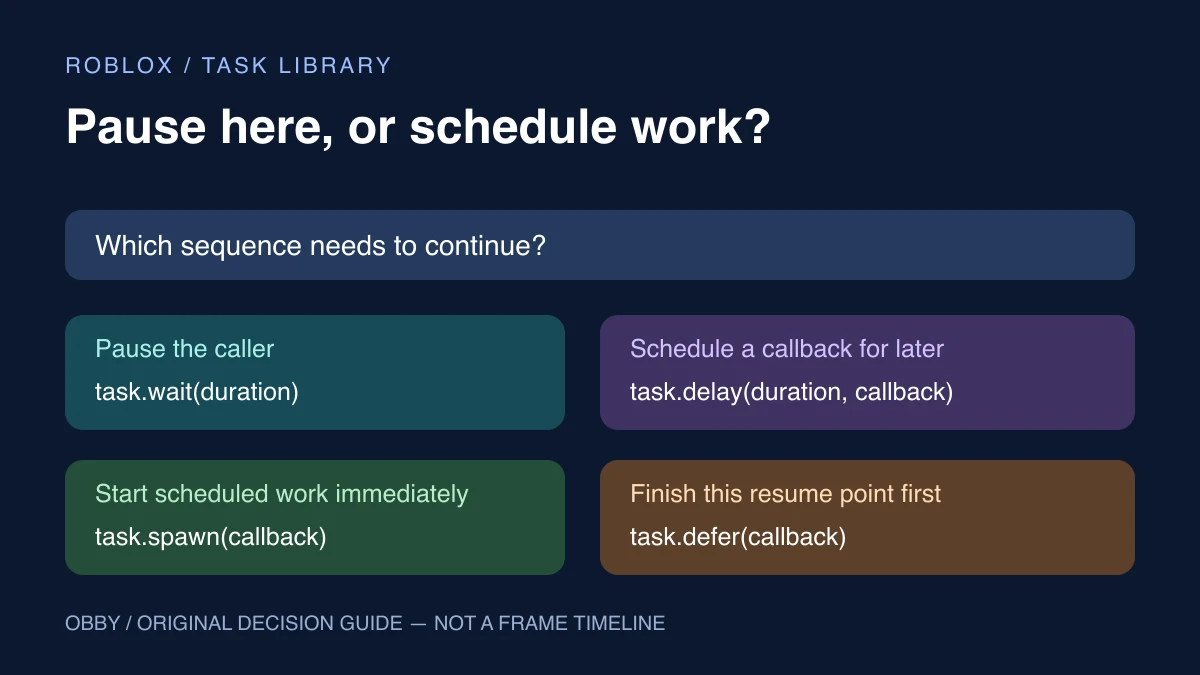
task.wait vs task.delay vs task.spawn vs task.defer
| Method | What happens to the caller? | When does the work run? | Typical intent |
|---|---|---|---|
| task.wait(seconds) | Current thread yields | It resumes after the duration, on a later scheduler step | Continue a sequence later |
| task.delay(seconds, callback) | Caller continues | Callback is scheduled after the duration | Do a separate action later |
| task.spawn(callback) | Resumed work runs until it yields or returns | Callback is resumed immediately through the scheduler | Start work that may itself yield |
| task.defer(callback) | Current resume point can finish | Callback is deferred to its end | Let current synchronous work finish first |
Roblox’s Schedule code guide documents these timing rules, including that actual waits and delays may vary. Do not turn a requested duration into a promise of an exact wall-clock completion time.
Run one observable scheduling experiment
Insert a regular Script in ServerScriptService in a practice place, open Output, and run the test. This complete example prints labels and measured elapsed durations. It creates no objects and changes no player data.
print("A: caller starts")

task.spawn(function()
    print("B: spawned work starts")
    local elapsed = task.wait(0.5)
    print("spawned work resumed after", elapsed, "seconds")
end)

task.defer(function()
    print("C: deferred work runs")
end)

local scheduledAt = os.clock()
task.delay(1, function()
    print("delayed callback ran after", os.clock() - scheduledAt, "seconds")
end)

print("E: caller continues")
local elapsed = task.wait(1.5)
print("caller resumed after", elapsed, "seconds")
Focus first on A, B, E, and C. Spawned work starts before the caller reaches E, then its own wait lets other scheduled work proceed. The deferred message runs after the caller’s current resume point finishes. The later messages report elapsed time; do not use their sample durations as exact expected measurements or assume a loaded server meets a precise deadline.
This exercise has been reviewed against current documentation but has not been executed here inside Studio. Run it in your own test session and inspect the measured results. Stop and restart between experiments so output from several copies does not become mixed.
Use task.wait when the current sequence should pause
Read a sequence from top to bottom. If the second operation must happen after the first pause, keep both operations on the same thread with task.wait between them. The returned number is useful when you want to display or inspect the actual elapsed wait.
Omitting the duration does not mean “do nothing.” It still yields. A loop that repeatedly updates a state needs a deliberate pacing strategy; a loop with no yielding point can prevent the work around it from progressing as intended. For frame-dependent movement, investigate the appropriate frame event rather than treating a small wait as a fixed frame rate.
Roblox recommends the task methods over legacy wait, spawn, and delay in its scheduling guide. When replacing old code, check what the code expects to happen before and after each yield instead of relying only on a search-and-replace operation.
Use task.delay when the caller should continue
Scheduling a callback is different from pausing the caller. In the example, the script prints E without waiting for the delayed message. The callback measures elapsed time from the scheduling point with os.clock.
The task library reference lists the delay signature as a duration followed by a function or thread, with optional arguments. Passing a function is different from calling it while constructing the arguments.
local function showMessage()
    print("Later message")
end

task.delay(2, showMessage) -- pass the function
-- task.delay(2, showMessage()) would call it immediately instead.
A delayed callback can outlive the UI, round, or object that originally scheduled it. Before applying its result, check that the intended owner and state are still current. For a round-specific message, retaining a round identifier and comparing it inside the callback is often clearer than assuming the same round is still active.
Use task.spawn deliberately
Separate scheduled work is useful when a function may yield and the caller should continue with its own sequence. It is not a guarantee that expensive computation becomes free or that several callbacks run simultaneously on different CPU cores.
A callback that never yields can finish before the caller reaches its next line. Starting it with task.spawn does not remove its execution cost.
Keep ownership explicit. If spawned work changes a table that the caller also reads, decide which values may be observed before that work finishes. When completion matters, design an explicit completion signal or state transition instead of guessing that a later line means the work has ended.
To experiment, move the spawned function’s first print after its wait. Observe which messages the caller can produce before that print. Change one thing at a time and retain the labels so the result stays interpretable.
Use task.defer for work after the current resume point
Deferral is useful when you want the current synchronous setup to finish before a callback runs. It is not interchangeable with a one-second delay. Avoid describing it as “the next frame” when the actual requirement is simply to let this resume point finish.
If several operations all need one initialized value, finish establishing that value before introducing callbacks that consume it. Passing an intended argument can make the dependency clearer than reading a variable that might be changed again before deferred work begins.
Scheduling does not replace a cooldown or a lock
Starting a delayed task does not prevent another event from scheduling a second one. If five events each schedule a callback, you have scheduled five callbacks unless your own state rejects or replaces them.
Use the per-player debounce guide when the requirement is a minimum interval between accepted actions. Use a busy state when an operation must finish before another begins. Those requirements describe eligibility; task methods describe when work is scheduled.
Debug timing with labels and ownership
- Label the caller and callback separately.
- Record the scheduling time and measure actual elapsed time.
- Find the first yielding operation in each path.
- Check whether the same event scheduled several callbacks.
- Check that an old callback is still allowed to affect current state.
- Stop duplicate test scripts before comparing output.
For a state that other code can observe, continue with the attributes exercise. For repeated interactions, use ProximityPrompt with explicit eligibility rules. For a visual transition, use the TweenService guide rather than manually guessing animation steps. To reuse a helper across scripts, start with the ModuleScript and require exercise. Documentation checked November 8, 2026.