Use Roblox TweenService when you want a property to change smoothly over time: a panel slides into view, a decorative object moves between positions, or a light changes color. Create the tween with a target instance, a TweenInfo configuration, and a table of destination values, then call Play.
Use the Color3 picker to convert a hex or RGB target before setting a color goal.
Make one visible tween before building a system
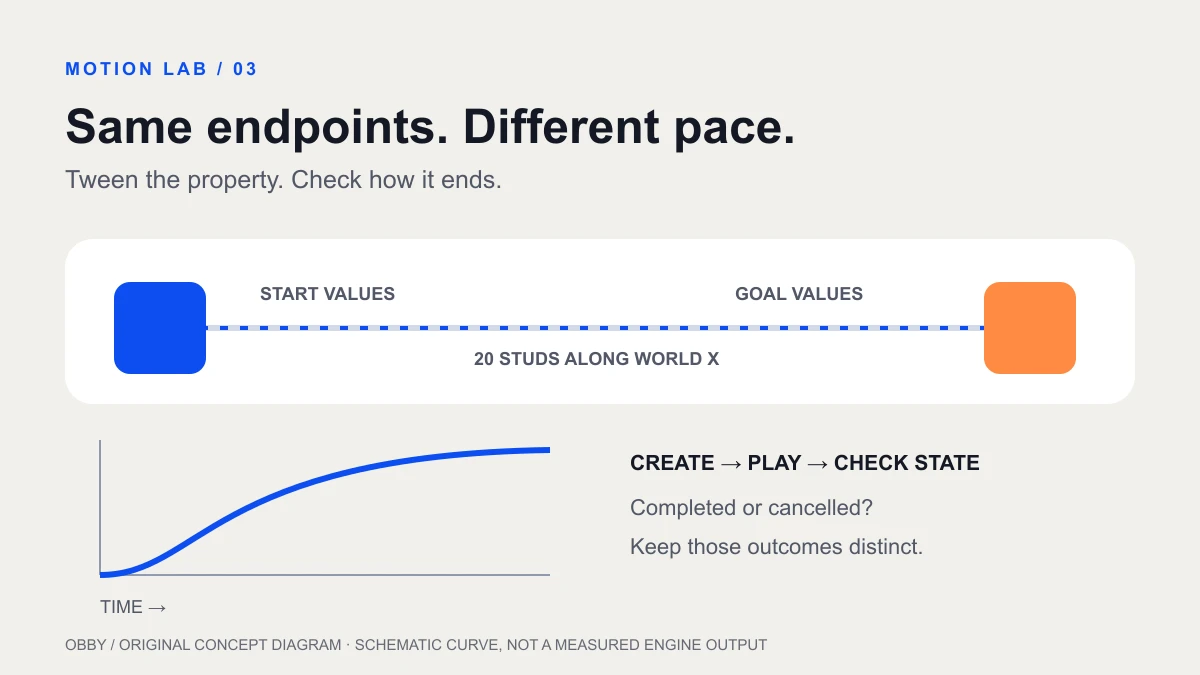
Open a simple practice place. Insert a regular Script in ServerScriptService and use the exercise below. It creates a small blue Part above the floor, waits three seconds, moves it twenty studs along the world X axis, changes it to orange, and reverses back to its initial values.
The Part is anchored and non-collidable. This is a visual motion exercise, not a complete rideable moving-platform controller. Find TweenDemo in Explorer during the test so you can inspect its position and color as well as watching the scene.
local TweenService = game:GetService("TweenService")

local part = Instance.new("Part")
part.Name = "TweenDemo"
part.Size = Vector3.new(6, 1, 6)
part.Position = Vector3.new(0, 6, 0)
part.Anchored = true
part.CanCollide = false
part.Color = Color3.fromRGB(13, 78, 241)
part.Parent = workspace

local info = TweenInfo.new(
    2, -- seconds for each direction
    Enum.EasingStyle.Quad,
    Enum.EasingDirection.InOut,
    0, -- no extra repeats
    true, -- return to the starting values
    0 -- no delay inside the tween
)

local tween = TweenService:Create(part, info, {
    Position = part.Position + Vector3.new(20, 0, 0),
    Color = Color3.fromRGB(255, 139, 67),
})

tween.Completed:Connect(function(state)
    if state == Enum.PlaybackState.Completed then
        print("TweenDemo finished its round trip")
    else
        warn("TweenDemo ended without completing:", state)
    end
end)

task.wait(3) -- brief observation window before movement
tween:Play()
The TweenService reference documents Create and Play. Creating a tween does not start it. Keep the returned Tween object when you need to pause, cancel, or observe completion.
Understand the three pieces
| Piece | In this exercise | What it controls |
|---|---|---|
| Target | part | The instance whose properties change |
| Timing | info | Duration, easing, repetition, reverse, delay |
| Goals | Position and Color | The destination values |
The goal table uses property names, not method names. Match each value to the property’s type: Position takes a Vector3 for this Part; Color takes a Color3. If a tween fails at creation, read the first Output error and check the target instance, spelling, and value type before changing the duration.
Record the start and end values before testing. “Move twenty studs along world X” is a precise expectation. “Make it slide nicely” leaves too many unknowns when you are trying to diagnose a setup problem.
Use the TweenInfo code generator to prepare timing and easing settings, then connect them to your target and goals.
Read TweenInfo in the right order
The TweenInfo constructor accepts duration, easing style, easing direction, repeat count, reverses, and delay time, in that order. The example uses a two-second outward motion and a reverse, with no extra repeats.
RepeatCount counts additional repetitions; zero does not mean “do nothing.” A negative repeat count loops indefinitely. Add infinite repetition only after you have seen one complete cycle and decided when the effect should stop. If your code waits for an infinitely repeating tween to finish naturally, the rest of that sequence will not progress as a normal finite animation would.
The initial task.wait in this exercise is just an observation pause before Play. It is separate from TweenInfo’s delay parameter. Change one of these deliberately rather than accidentally leaving both in a production sequence.
Choose an easing style for the job
Compare the same movement with Linear and Quad before trying a more expressive curve. Keep the duration and endpoints fixed so you can judge the pacing rather than the distance. Then compare In, Out, and InOut directions with the same style.
For a quiet settings panel, try a restrained arrival and check that the text remains readable. For an arcade reward reveal, a more pronounced motion may suit the scene. Treat those as design experiments: choose the one that communicates the state change clearly at your actual screen size.
Do not use a flashy curve to hide an incorrect endpoint. First verify where the object starts and finishes. Then tune duration. Finally tune the motion’s character. Keep a short note of what you changed between comparisons.
Handle completion and cancellation differently
The TweenBase reference documents playback state and the Completed event. Completed also fires when a tween is cancelled, so inspect its state argument before continuing a sequence that requires a successful finish.
Cancel stops the tween without restoring the instance’s original properties. Pause preserves playback progress for resuming. Decide whether your interface should continue from its current position, restart, or snap to a known state; those are different interaction designs.
If two tweens try to change the same property on the same instance, the newer one cancels the older conflicting tween. Keep one owner for that property’s animation. For a menu button, store the active tween and define what a second click should do while the first transition is in progress.
Use the right execution context
The practice script runs on the server and changes a world object. A player’s personal menu animation belongs with that player’s interface code, commonly a LocalScript beneath the GUI or an appropriate client controller. Preserve the distinction between visual feedback and gameplay authority.
For a door interaction, let the server decide whether the player is allowed to open it, then animate the intended state change. The proximity prompt guide gives a small server-checked interaction to study first. An animation finishing should not by itself grant a reward or establish ownership of an item.
Separate movement tools by purpose
Tweening an anchored decorative Part is different from navigating a character through obstacles. Use the pathfinding guide for route computation and recovery. Use animation tracks for authored character poses and motion clips.
Moving a multi-part Model is another task: a Model does not have a Part-style Position property to put in this goal table. Plan around its pivot and how its parts are assembled. Follow the Model pivot tween exercise rather than replacing the Part target with a Model.
Debug a tween that does not move
- Confirm the script runs and inspect Output for the first error.
- Check that Create receives the intended instance and a valid property table.
- Confirm Play is called after construction.
- Compare the current property value with the goal; identical values produce no visible transition for that property.
- Look for another script or tween continuously overwriting the same property.
- Inspect delay, repeat, reverse, and cancellation before assuming the duration is wrong.
Keep the simple scene until you can explain every visible result. Then bring one effect into your game and test repeated input, interruption, and the final state. The Luau exercise was reviewed against current documentation but has not been executed here in Studio. Documentation checked November 8, 2026.