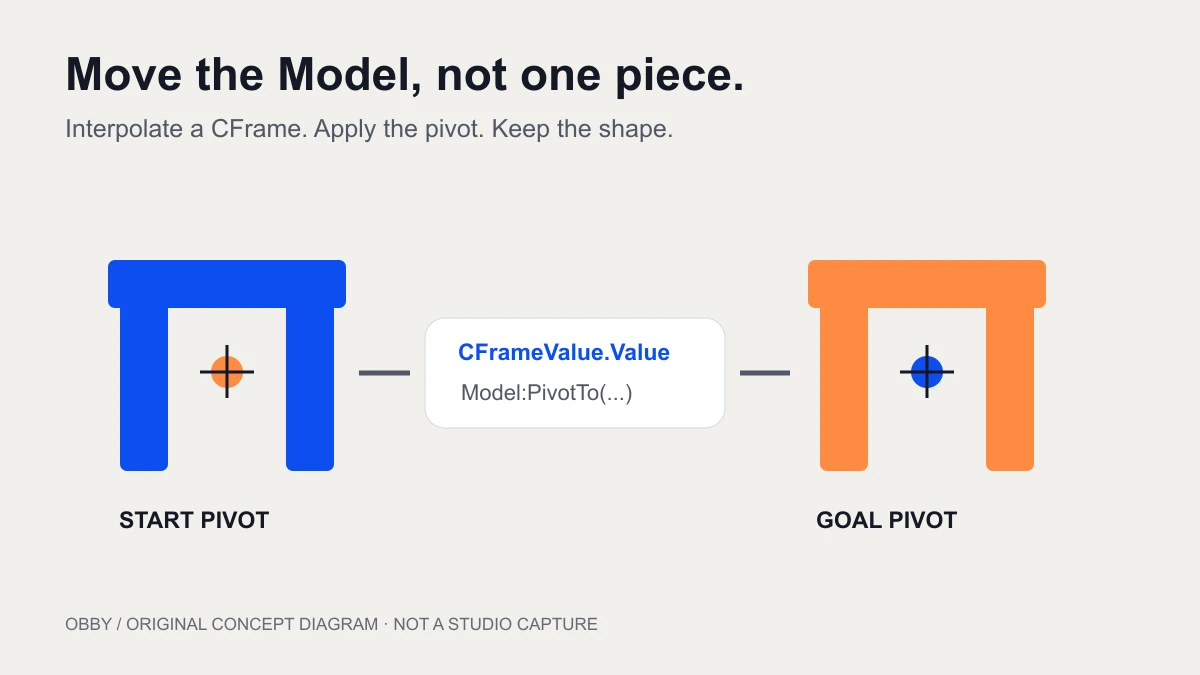
To tween a Roblox Model, animate a CFrame value and apply each update with Model:PivotTo. A Model does not expose the same Position property as a Part, so substituting a Model into a Part-position tween is not enough.
Start with an anchored decorative Model
Use a small practice place with clear floor space. Insert a regular Script in ServerScriptService. The exercise below creates an arch from three anchored, non-collidable Parts and moves the whole assembly sixteen studs along world X after a three-second pause.
It is a visual exercise. It does not implement a rideable elevator, a physics-driven vehicle, or an NPC controller. Keeping collision out of this first test lets you judge whether the complete Model maintains its shape before adding gameplay constraints.
Use a CFrame driver and PivotTo
local TweenService = game:GetService("TweenService")

local model = Instance.new("Model")
model.Name = "TweenArch"
model.Parent = workspace

local pieces = {
    {Vector3.new(2, 6, 2), Vector3.new(-4, 4, 0)},
    {Vector3.new(2, 6, 2), Vector3.new(4, 4, 0)},
    {Vector3.new(10, 2, 2), Vector3.new(0, 8, 0)},
}
for index, piece in ipairs(pieces) do
    local part = Instance.new("Part")
    part.Name = "Piece" .. index
    part.Size = piece[1]
    part.Position = piece[2]
    part.Anchored = true
    part.CanCollide = false
    part.Color = Color3.fromRGB(13, 78, 241)
    part.Parent = model
end

local start = model:GetPivot()
local goal = start + Vector3.new(16, 0, 0)
local driver = Instance.new("CFrameValue")
driver.Value = start

local moveConnection = driver:GetPropertyChangedSignal("Value"):Connect(function()
    model:PivotTo(driver.Value)
end)

local tween = TweenService:Create(
    driver,
    TweenInfo.new(3, Enum.EasingStyle.Quad, Enum.EasingDirection.InOut),
    {Value = goal}
)
tween.Completed:Once(function(state)
    moveConnection:Disconnect()
    driver:Destroy()
    print("Model tween ended:", state)
end)

task.wait(3)
tween:Play()
The PVInstance reference documents GetPivot and PivotTo, which Models inherit. The CFrameValue reference documents its Value property. TweenService interpolates that property; the connection applies the current value to the Model’s pivot.
Know which object the tween actually targets
The tween’s target is driver, not model and not one of the arch’s Parts. Its goal table therefore contains Value. The callback is the bridge from that interpolated transform to the visible assembly.
This makes a useful debugging split. If the driver’s Value changes but the Model does not move, inspect the callback and model reference. If the driver does not change, inspect tween creation, Play, the goal, and playback state. Keep both checks visible in your test notes rather than replacing the entire script after an unexplained result.
Compare the whole assembly before and after
Find TweenArch in Explorer while playtesting. Watch both posts and the beam, then compare the final arrangement with the start. Their spacing should remain unchanged while the assembly shifts to its destination.
For a second test, add a small differently colored marker Part under the same Model. This makes unintended rotation or missing descendants easier to notice. Record the expected offset before testing. Avoid adding a complex imported asset until your small Model behaves consistently.
Do I need a PrimaryPart?
This exercise deliberately uses GetPivot and PivotTo without assigning a PrimaryPart. A PrimaryPart can still be useful for defining the reference of an assembled object, but it is not a requirement for this pivot-based example. Decide where your Model’s pivot should be before designing rotations or precise alignment.
A decorative arch, a hinged door, and a vehicle may need different reference points. A centered pivot that looks reasonable for translation can be wrong for a hinge motion. Inspect the pivot in Studio and use a simple quarter-turn test before authoring a longer sequence.
The CFrame coordinate guide offers a smaller point-conversion exercise before you adapt local offsets to an entire Model.
Keep world-space and local-space goals distinct
The example adds a Vector3 offset to the starting CFrame to translate along world X while retaining its orientation. A goal built with start multiplied by CFrame.new uses an offset relative to the starting transform instead. The difference matters once the Model is rotated.
Write “move east in the world” or “move along the Model’s right direction” in your test plan. Do not treat these as interchangeable. Test with a visibly rotated copy so an accidental assumption about alignment cannot hide behind an unrotated scene.
Clean up when the movement ends
The one-time completion callback disconnects the value listener and destroys the temporary driver. It prints the ending playback state. A cancellation is an end to this attempt, not proof that the Model reached its target; the example leaves the Model where movement stopped.
For a repeated interaction, create a new driver and tween for each attempt or deliberately manage a reusable controller. Do not keep appending listeners. Give one controller ownership of the Model’s pivot so two concurrent animations do not continually reposition the same assembly.
When a second input interrupts an active movement, define the intended result first: ignore it, cancel and restart from the current pivot, or queue a later action. The correct policy depends on the object. A door and a reward display need not behave the same way.
Choose timing after the geometry works
The TweenInfo generator lets you prepare easing, direction, repeat, reverse, and delay settings. Start with one finite movement. Keep the start and goal fixed while comparing durations, then adjust easing after the endpoints are correct.
Read the TweenService introduction for a single-Part exercise and completion-state checks. For a character that must find its way around walls, use pathfinding rather than treating a direct transform tween as route navigation.
Debug a Model that breaks apart or does not move
| Symptom | Inspect first |
|---|---|
| Position is not a valid member | A Part goal table was given to a Model |
| Only one piece moves | One Part was targeted rather than applying the Model pivot |
| Nothing changes | Script execution, Output, driver Value, callback, and Play |
| Direction looks wrong after rotation | World-space versus local-space goal |
| Object jitters during repeated input | Competing pivot owners and leftover listeners |
Run the exercise in your own Studio practice place before adapting it to a production asset. The code was reviewed against current APIs but has not been executed here inside Studio. Documentation checked November 8, 2026.