An Animation references a published clip. An Animator loads it. The returned AnimationTrack controls playback on that Animator: start, stop, speed, looping, and priority. Keep these roles separate when debugging a clip that previews correctly but does not play in your experience.
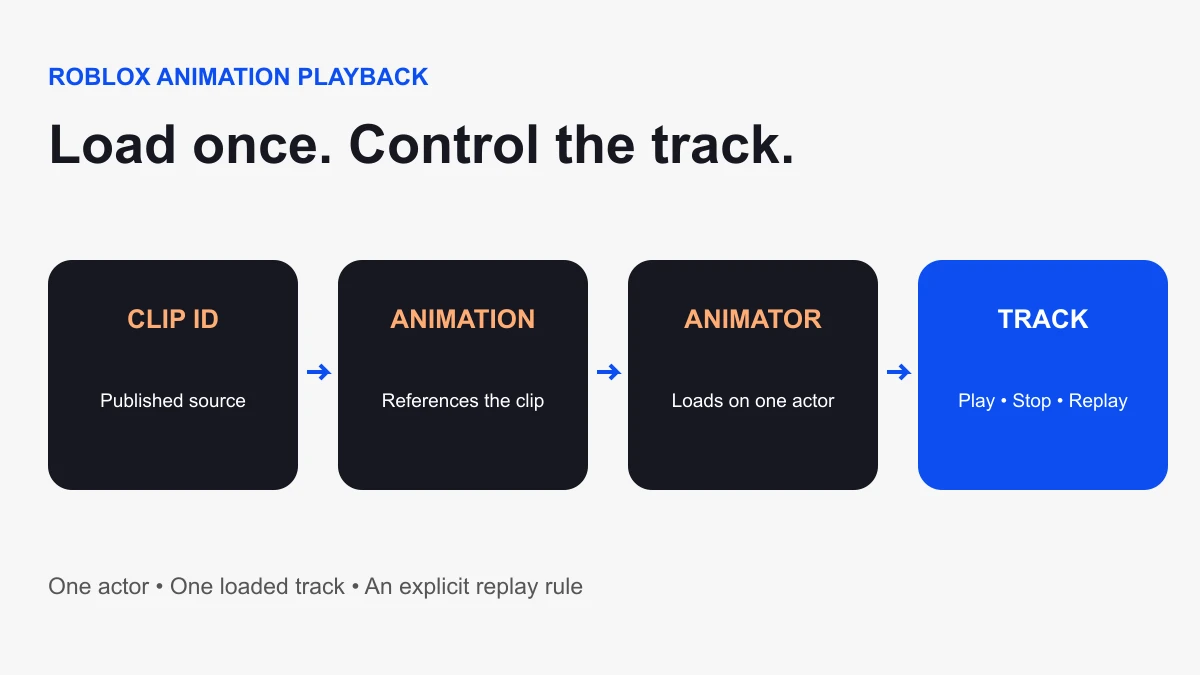
What gets created when you load a clip?
Animator:LoadAnimation(animation) returns a new track each time it is called. Load once for a reusable interaction instead of loading again on every trigger. The Animator must be in Workspace when loading. Roblox documents the behavior in the Animator API reference.
Think of the clip as the source and the track as one playback instance attached to one actor. A track loaded for one NPC is not a shared playback handle for every NPC. When planning an interaction, write down the actor, the clip, the trigger, and the rule for a second trigger.
Prepare a controlled NPC test
- Publish a short greeting animation made for your chosen rig. Use an asset that your experience is allowed to use.
- Insert a matching rig in Workspace and rename it
GreetingNPC. This example expects a Humanoid and HumanoidRootPart. - Keep the NPC in a clear practice area. Anchor its HumanoidRootPart to hold this demonstration in place; do not anchor each limb.
- Create a normal server Script in ServerScriptService with default Legacy RunContext.
- Replace the zero asset placeholder below with the animation’s numeric ID.
The example creates an interaction prompt, loads one track, and ignores new triggers while that track is playing. The action is a visual greeting only. It does not award currency, authorize purchases, or validate a gameplay transaction.
Load once, replay from a prompt
local rig = workspace:WaitForChild("GreetingNPC")
local humanoid = rig:WaitForChild("Humanoid")
local root = rig:WaitForChild("HumanoidRootPart")
local animator = humanoid:FindFirstChildOfClass("Animator")
if not animator then
  animator = Instance.new("Animator")
  animator.Parent = humanoid
end

local animationId = "rbxassetid://0" -- Replace 0 with your clip ID
if animationId == "rbxassetid://0" then
  warn("Set animationId to your published greeting clip")
  return
end

local animation = Instance.new("Animation")
animation.AnimationId = animationId
local loaded, result = pcall(function()
  return animator:LoadAnimation(animation)
end)
if not loaded then
  warn("Greeting clip could not load: " .. tostring(result))
  animation:Destroy()
  return
end

local track = result
track.Looped = false
track.Priority = Enum.AnimationPriority.Action

local prompt = Instance.new("ProximityPrompt")
prompt.ActionText = "Wave"
prompt.ObjectText = "Greeting NPC"
prompt.HoldDuration = 0
prompt.MaxActivationDistance = 10
prompt.Parent = root

local triggerConnection = prompt.Triggered:Connect(function()
  if humanoid.Health <= 0 or track.IsPlaying then return end
  track:Play(0.15)
end)

local cleanupConnection
cleanupConnection = rig.Destroying:Connect(function()
  triggerConnection:Disconnect()
  cleanupConnection:Disconnect()
  track:Stop(0)
  track:Destroy()
  animation:Destroy()
  prompt:Destroy()
end)
The protected load catches immediate errors, but it is not proof of asset permission, successful download, or visible motion. Inspect Output and the actual actor during the test. A valid-looking asset URI can still point to the wrong asset.
Choose a repeated-trigger policy
This example ignores a trigger while IsPlaying is true. That choice keeps a greeting from restarting repeatedly as players interact. Other mechanics may restart, queue, or interrupt an action. Choose deliberately and test two people triggering at nearly the same time. Avoid silently creating a second track to solve a replay problem.
A gameplay action also needs a separate state rule: whether an attack can deal damage, whether an item can be collected, or whether a player can move. Animation visibility is feedback; it should not be the sole authority for those outcomes.
Priority and blending explain competing motion
A running idle or movement clip can interact with your greeting. Track priority influences which poses win when animations overlap. In this example, Action is an intentional choice for a short greeting. Raising every track to the highest priority is a poor substitute for understanding the overlap.
Roblox’s AnimationTrack reference describes playback methods, fade times, weights, and priority. Start with one competing track at a time when diagnosing a blend. Check whether the greeting contains poses for body sections you intended to leave alone.
Check replication with two clients
The example loads and plays an NPC animation on the server. A server-created Animator is required for replication. Player-character playback has different context rules; do not move this NPC script into a LocalScript and assume the same visibility. Review the Animator reference before adapting it.
In a Studio multi-client test, trigger the prompt from one client and watch from the other. Repeat from the second client, then trigger rapidly while playback is active. Write down what both clients see. A successful single-player preview is insufficient evidence for multiplayer visibility.
Debug by the stage that failed
- No prompt: check the rig name, HumanoidRootPart, Script location, and Output. WaitForChild can wait indefinitely for a misspelled object.
- Placeholder warning: enter the published animation ID.
- Load error or no movement: check asset access, intended rig, joints, and competing tracks.
- First client sees motion, second does not: inspect Animator creation and playback context.
- Repeated motion behaves strangely: count load calls and inspect the trigger policy.
- Wrong limbs move: compare the published clip with the rig used to create it.
Before publishing, test a first trigger, a second trigger after completion, overlapping triggers, and rig removal. The sample is a small NPC prototype; Studio execution of your asset and rig remains the decisive check. For authoring the clip, follow our first animation guide. For locating other playback code, use Find All in Studio. API sources checked October 6, 2026.