A Roblox inventory system needs a source of ownership, a visible item list, and a way to request actions. This practice example keeps ownership on the server, displays two owned items in a custom panel, and lets a player request equip or unequip. The client never grants itself an item.
What this example includes
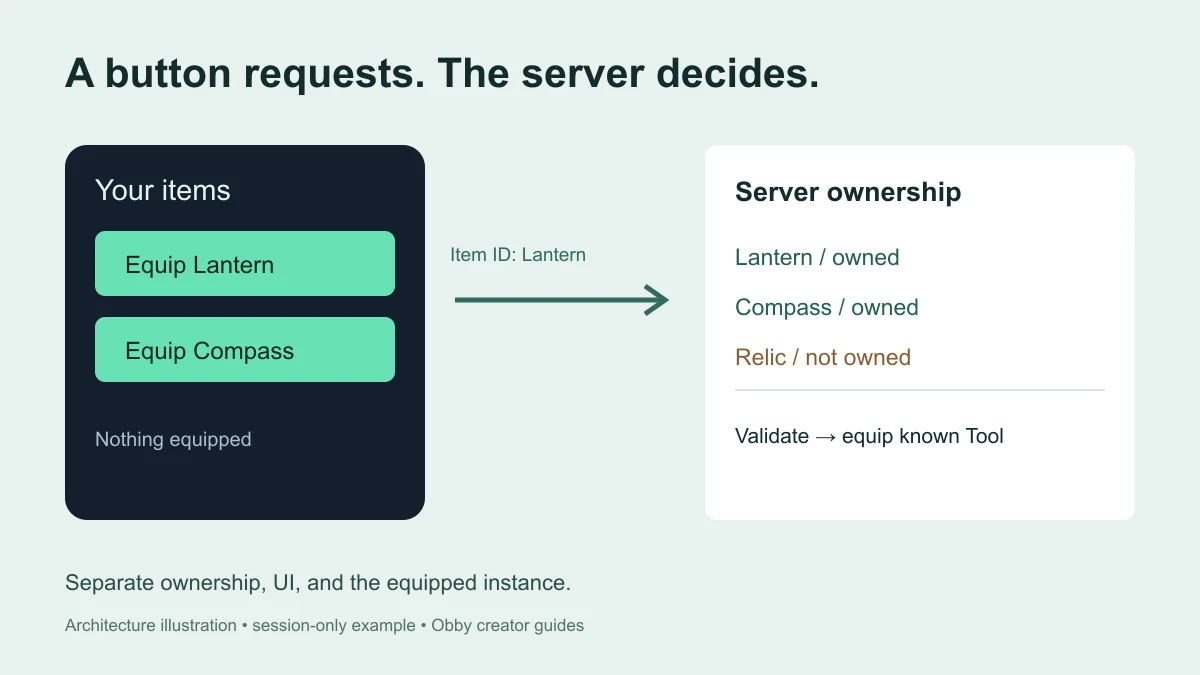
Each player starts with Lantern and Compass as session-owned item IDs. Relic exists in the server catalog but is not owned. The panel displays the two owned choices, opens and closes from an Inventory button, and reflects the server's equipped-item attribute. These are nonphysical placeholder Tools: Lantern does not emit light and Compass does not navigate.
This is a fixed-catalog starter system. It does not include stacks, item grants, trading, purchases, save data, or a dynamic item database. For a single standard Tool and its Handle, start with the Tool tutorial. If you are looking for player controls rather than building a system, use how to open Roblox inventory.
Set up a spare practice place
- Create a spare place with a normal player character and a floor.
- Place one regular Script in ServerScriptService and paste the server example below.
- Place one LocalScript in StarterPlayer → StarterPlayerScripts and paste the client example.
- Keep other inventory practice copies out of the place. The server reserves InventoryPractice in ReplicatedStorage and InventoryPracticeView under each Player.
- Start a player playtest. Open Inventory, then select Equip Lantern. Compare the panel status with the Tool under your character.
The scripts have passed syntax checks and server-rule tests using mocked Roblox objects. They have not been executed in Studio for this guide. The checklist below describes expected outcomes to verify in your installed Studio, including the GUI and replication paths that a mock cannot establish.
Download the exact examples: server.lua and client.lua. Use the server file as a regular Script and the client file as a LocalScript; they belong in different locations.
Server Script: own the inventory and validate requests
The server creates private Tool templates, a request event, and a replicated view for the panel. Its separate ownership table decides which IDs each player may equip. A replicated BoolValue is presentation data, so adding a client-side row does not grant ownership.
-- Regular Script in ServerScriptService, in a spare practice place.
-- Session-only example: no purchases, rewards, trading, or persistence.
-- Documentation-reviewed; not executed in Roblox Studio for this guide.
local Players = game:GetService("Players")
local ReplicatedStorage = game:GetService("ReplicatedStorage")
local ServerStorage = game:GetService("ServerStorage")

assert(not ReplicatedStorage:FindFirstChild("InventoryPractice"), "Use one inventory practice server Script")
local remotes = Instance.new("Folder")
remotes.Name = "InventoryPractice"
local request = Instance.new("RemoteEvent")
request.Name = "EquipRequest"
request.Parent = remotes
remotes.Parent = ReplicatedStorage

local templates = Instance.new("Folder")
templates.Name = "InventoryPracticeTemplates"
templates.Parent = ServerStorage
local catalog = { Lantern = true, Compass = true, Relic = true }
for itemId in pairs(catalog) do
    local tool = Instance.new("Tool")
    tool.Name = itemId
    tool.RequiresHandle = false
    tool.CanBeDropped = false
    tool:SetAttribute("InventoryPracticeTool", true)
    tool.Parent = templates
end

local owned = {} -- Server authority. Replicated UI values are only a view.
local equippedTools = {}
local lastRequest = {}
local characterConnections = {}

local function clearPracticeTools(container)
    if not container then return end
    for _, child in ipairs(container:GetChildren()) do
        if child:IsA("Tool") and child:GetAttribute("InventoryPracticeTool") == true then
            child:Destroy()
        end
    end
end

local function setup(player)
    if owned[player] or player.Parent ~= Players then return end
    assert(not player:FindFirstChild("InventoryPracticeView"), "Practice view name is already in use")
    owned[player] = { Lantern = true, Compass = true }
    player:SetAttribute("InventoryPracticeEquipped", "")
    local view = Instance.new("Folder")
    view.Name = "InventoryPracticeView"
    for itemId in pairs(owned[player]) do
        local entry = Instance.new("BoolValue")
        entry.Name = itemId
        entry.Value = true
        entry.Parent = view
    end
    view.Parent = player
    characterConnections[player] = player.CharacterAdded:Connect(function()
        equippedTools[player] = nil
        player:SetAttribute("InventoryPracticeEquipped", "")
    end)
end

Players.PlayerAdded:Connect(setup)
Players.PlayerRemoving:Connect(function(player)
    owned[player] = nil
    equippedTools[player] = nil
    lastRequest[player] = nil
    if characterConnections[player] then
        characterConnections[player]:Disconnect()
        characterConnections[player] = nil
    end
end)
for _, player in ipairs(Players:GetPlayers()) do setup(player) end

request.OnServerEvent:Connect(function(player, itemId)
    if player.Parent ~= Players or not owned[player] then return end
    local now = os.clock()
    if now - (lastRequest[player] or -math.huge) < 0.25 then return end
    lastRequest[player] = now
    if typeof(itemId) ~= "string" or #itemId > 32 then return end
    local inventory = owned[player]
    if not inventory or catalog[itemId] ~= true or inventory[itemId] ~= true then return end
    local character = player.Character
    local humanoid = character and character:FindFirstChildOfClass("Humanoid")
    local backpack = player:FindFirstChildOfClass("Backpack")
    if not humanoid or humanoid.Health <= 0 or not backpack then return end

    local current = equippedTools[player]
    local alreadyEquipped = current and current.Parent == character and current.Name == itemId
    equippedTools[player] = nil
    clearPracticeTools(backpack)
    clearPracticeTools(character)
    player:SetAttribute("InventoryPracticeEquipped", "")
    if alreadyEquipped then return end

    local tool = templates[itemId]:Clone()
    tool.Parent = backpack
    equippedTools[player] = tool
    tool.Unequipped:Connect(function()
        if equippedTools[player] == tool then
            equippedTools[player] = nil
            player:SetAttribute("InventoryPracticeEquipped", "")
        end
    end)
    humanoid:EquipTool(tool)
    if tool.Parent == character then
        player:SetAttribute("InventoryPracticeEquipped", itemId)
    else
        equippedTools[player] = nil
        tool:Destroy()
        warn("Practice Tool did not equip for", player.Name)
    end
end)
Client LocalScript: show items and request an action
The panel uses button Activated events for its open/close and item actions. It waits for the two fixed item-view entries, sends only an item ID, and reads the server-published equipped attribute. The panel remains available across character respawns because its ScreenGui has ResetOnSpawn disabled.
-- LocalScript in StarterPlayer > StarterPlayerScripts.
-- Documentation-reviewed; not executed in Roblox Studio for this guide.
local Players = game:GetService("Players")
local ReplicatedStorage = game:GetService("ReplicatedStorage")
local player = Players.LocalPlayer
local playerGui = player:WaitForChild("PlayerGui")
local view = player:WaitForChild("InventoryPracticeView")
view:WaitForChild("Lantern")
view:WaitForChild("Compass")
local request = ReplicatedStorage:WaitForChild("InventoryPractice"):WaitForChild("EquipRequest")

if playerGui:FindFirstChild("InventoryPracticeGui") then return end
local gui = Instance.new("ScreenGui")
gui.Name = "InventoryPracticeGui"
gui.ResetOnSpawn = false
local panel = Instance.new("Frame")
panel.Name = "Panel"
panel.Size = UDim2.new(0.85, 0, 0, 226)
panel.Position = UDim2.new(0.5, 0, 0.5, 0)
panel.AnchorPoint = Vector2.new(0.5, 0.5)
panel.BackgroundColor3 = Color3.fromRGB(19, 31, 45)
panel.Visible = false
panel.Parent = gui
local limit = Instance.new("UISizeConstraint")
limit.MaxSize = Vector2.new(380, 226)
limit.Parent = panel
local corner = Instance.new("UICorner")
corner.CornerRadius = UDim.new(0, 16)
corner.Parent = panel
local title = Instance.new("TextLabel")
title.Size = UDim2.new(1, -32, 0, 40)
title.Position = UDim2.fromOffset(16, 10)
title.BackgroundTransparency = 1
title.Text = "Your items"
title.TextColor3 = Color3.fromRGB(225, 245, 238)
title.TextSize = 20
title.Font = Enum.Font.GothamBold
title.Parent = panel
local status = Instance.new("TextLabel")
status.Size = UDim2.new(1, -32, 0, 28)
status.Position = UDim2.fromOffset(16, 182)
status.BackgroundTransparency = 1
status.TextColor3 = Color3.fromRGB(173, 190, 206)
status.TextSize = 14
status.Font = Enum.Font.Gotham
status.Parent = panel

local toggle = Instance.new("TextButton")
toggle.Name = "InventoryToggle"
toggle.Size = UDim2.fromOffset(160, 44)
toggle.Position = UDim2.new(0.5, 0, 1, -24)
toggle.AnchorPoint = Vector2.new(0.5, 1)
toggle.Text = "Inventory"
toggle.TextSize = 18
toggle.Font = Enum.Font.GothamBold
toggle.BackgroundColor3 = Color3.fromRGB(225, 245, 238)
toggle.TextColor3 = Color3.fromRGB(19, 31, 45)
toggle.Parent = gui
toggle.Activated:Connect(function()
    panel.Visible = not panel.Visible
    toggle.Text = panel.Visible and "Close inventory" or "Inventory"
end)

local buttons = {}
local function render()
    local equipped = player:GetAttribute("InventoryPracticeEquipped") or ""
    status.Text = equipped == "" and "Nothing equipped" or ("Equipped: " .. equipped)
    for itemId, button in pairs(buttons) do
        local entry = view:FindFirstChild(itemId)
        local available = entry and entry:IsA("BoolValue") and entry.Value
        button.Visible = available == true
        button.Text = (equipped == itemId and "Unequip " or "Equip ") .. itemId
    end
end

for index, itemId in ipairs({ "Lantern", "Compass" }) do
    local id = itemId
    local button = Instance.new("TextButton")
    button.Name = id
    button.Size = UDim2.new(1, -32, 0, 48)
    button.Position = UDim2.fromOffset(16, 58 + (index - 1) * 60)
    button.BackgroundColor3 = Color3.fromRGB(105, 225, 181)
    button.TextColor3 = Color3.fromRGB(15, 40, 34)
    button.TextSize = 18
    button.Font = Enum.Font.GothamBold
    button.Parent = panel
    local rounding = Instance.new("UICorner")
    rounding.CornerRadius = UDim.new(0, 10)
    rounding.Parent = button
    button.Activated:Connect(function()
        request:FireServer(id) -- Request an ID, never an ownership grant.
    end)
    buttons[id] = button
end

-- Bind to the existing view; this fixed-catalog exercise does not add/remove item IDs.
for _, entry in ipairs(view:GetChildren()) do
    if entry:IsA("BoolValue") then entry:GetPropertyChangedSignal("Value"):Connect(render) end
end
player:GetAttributeChangedSignal("InventoryPracticeEquipped"):Connect(render)
render()
gui.Parent = playerGui
Understand the request boundary
Roblox's client-server security guidance requires server validation of client-triggered actions. Here, a request must come from a present, initialized player; carry a short string ID; identify a catalog item the player owns; and have a live character with a Backpack. The per-player time gate rejects requests that arrive less than a quarter second apart.
The server does not accept a client-selected Tool instance, balance, quantity, or ownership table. It clones a known template after validation. These checks cover this small equip operation; adding a shop or reward system creates additional rules that must be validated in their own server workflow. The RemoteEvents guide explains the request boundary further.
Keep ownership separate from equipped state
Owning Lantern means the server permits that item ID. Equipping it creates a temporary Tool instance and asks the character's Humanoid to equip it. Clicking the same equipped item again removes the practice Tool. Selecting Compass replaces the current practice Tool.
The code tracks the actual Tool instance, not just its name. If the normal hotbar unequips it, the Unequipped handler clears the panel's status. That handler checks instance identity so a late event from an older Tool cannot clear the status of a newer one. Other Tools in your game are not deleted by the practice cleanup.
See the Tool reference for its events and RequiresHandle setting, and the Humanoid EquipTool reference for the equipment method. The example disables RequiresHandle because these placeholders have no geometry.
Test the full player lifecycle
| Test | Expected observation |
|---|---|
| Open and close Inventory | Panel visibility and toggle label agree |
| Equip Lantern | One practice Lantern Tool under the character; matching panel status |
| Select Lantern again | Practice Tool removed; Nothing equipped |
| Switch Lantern to Compass | No duplicate practice Tools; Compass selected |
| Use normal hotbar unequip | The panel stops claiming the Tool is equipped |
| Reset character | Panel survives; equipped status clears; owned choices remain available |
| Two-player server test | Each player has separate ownership and equipped state |
| Leave and rejoin | Fresh starter ownership; no saved progress is implied |
| Small touch viewport | Both item actions and the Inventory toggle remain reachable |
Also test intentionally invalid requests in a controlled development environment: an unknown ID, Relic, a non-string payload, and a repeated request inside the time gate. They should not create Tools. Test your final game through normal inputs as well; remote rejection tests do not prove a usable interface.
Troubleshoot the first missing step
- No Inventory button: inspect the LocalScript location, PlayerGui, and client Output. A missing server view can leave the client waiting before UI creation.
- Duplicate setup error: remove the extra practice Script copy in your spare place instead of bypassing the guard.
- Click appears ignored: wait beyond the quarter-second gate and verify the character is alive. The UI changes after server state arrives; it does not optimistically claim success.
- No visible lantern model: these placeholders have no Handle or mesh. Add original geometry deliberately using the Tool guide when the inventory flow is verified.
- A new item never appears: this client has a fixed two-item layout. A dynamic catalog needs row creation, removal, and connection cleanup rather than only adding an entry to one table.
For a separate worked purchase example, see how to make a Coins shop. It uses its own session profile and does not automatically share this inventory.
Extend only after the starter flow works
First add a real visual model to one Tool and retest equip, unequip, and respawn. Then choose one new inventory behavior, such as a server-awarded item or a dynamic row list. Keep a written ownership rule for that change. A UI button should express an action that the server independently permits.
Persistence is a separate phase. A table in this server process does not survive rejoining or shutdown. Design loading, save failure handling, and session consistency before calling an inventory saved. Do not place untested data-store writes into every button handler.
For an Obby project, describe the starting items, who can grant them, the equip behavior, and the intended device controls. Review those behaviors in Studio before adding commerce or publishing.
Documentation reviewed November 21, 2026.