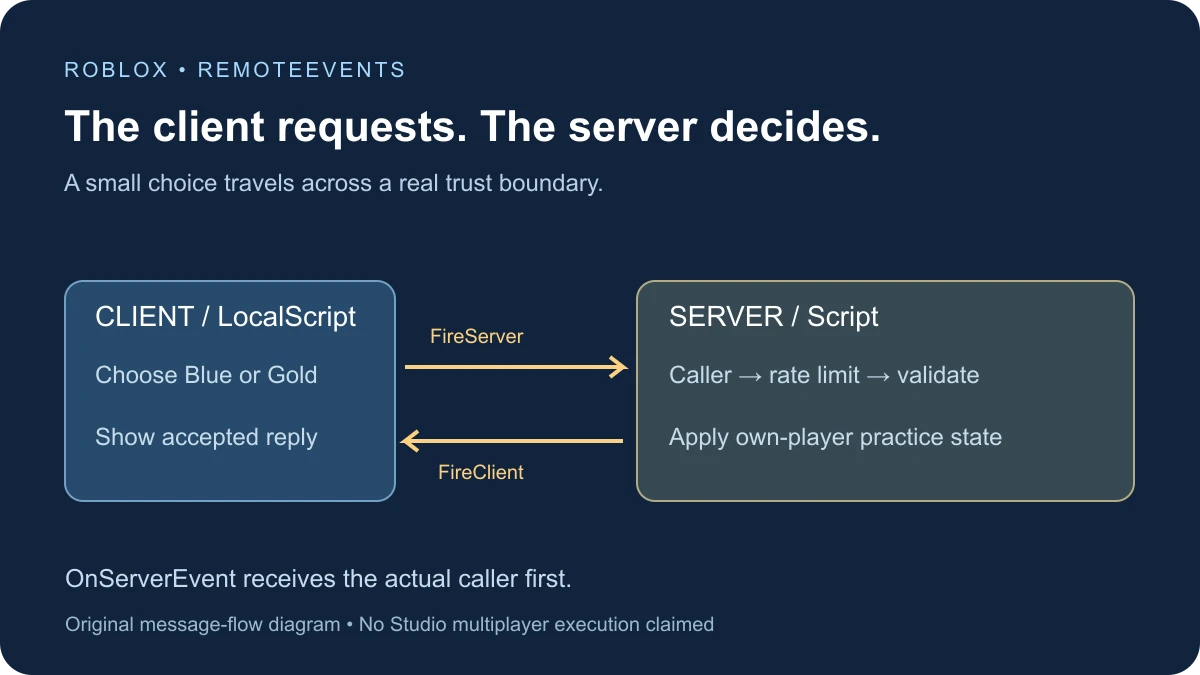
Roblox RemoteEvents send messages across the client/server boundary. A LocalScript calls FireServer; a server Script receives OnServerEvent with the actual calling Player as its first argument. The server can reply to that player with FireClient, which the LocalScript receives through OnClientEvent.
Keep the two execution contexts clear
A player’s interface runs on their client. Shared gameplay rules usually need server ownership. The official remote communication guide explains the direction-specific calls and the automatically supplied caller on the server.
Do not add a Player argument to FireServer as if the client gets to choose who made the request. Use the caller Roblox supplies. When sending a targeted reply, FireClient takes the intended Player on the server side.
Build a harmless request-and-reply exercise
This example lets a player choose Blue or Gold. The server validates that small set, records PracticeChoice on the actual caller, and replies only to them. It does not award currency, grant an item, or change another player.
Use a spare place with one server Script and one LocalScript. Both use the same RemoteEvent in ReplicatedStorage. The server creates it after connecting its handler; the client waits for that object rather than making a separate local copy.
The code is documentation-reviewed but has not been executed in Studio for this guide. The test plan below describes what you should observe, not a captured multiplayer result.
1. Create the server receiver
Put this regular Script in ServerScriptService. Start with no object named ObbyRemoteEventPractice in ReplicatedStorage. The duplicate check helps expose an accidental second copy of the practice setup instead of silently wiring several handlers.
-- Regular Script in ServerScriptService, in a spare place.
-- Documentation-reviewed; not executed in Studio for this guide.
local Players = game:GetService("Players")
local ReplicatedStorage = game:GetService("ReplicatedStorage")
local NAME = "ObbyRemoteEventPractice"
if ReplicatedStorage:FindFirstChild(NAME) then
    warn("Use one practice server Script and no existing object named " .. NAME)
    return
end

local remote = Instance.new("RemoteEvent")
remote.Name = NAME
local allowed = {Blue = true, Gold = true}
local lastRequest = {}

remote.OnServerEvent:Connect(function(player, choice)
    local now = os.clock()
    if now - (lastRequest[player] or -math.huge) < 0.5 then return end
    lastRequest[player] = now
    if typeof(choice) ~= "string" or not allowed[choice] then return end

    -- Only the actual caller's harmless practice state is changed.
    player:SetAttribute("PracticeChoice", choice)
    print("Server accepted", player.Name, choice)
    remote:FireClient(player, choice)
end)
Players.PlayerRemoving:Connect(function(player)
    lastRequest[player] = nil
end)
-- Publish after connecting the server handler.
remote.Parent = ReplicatedStorage
The rate limit runs on the server and applies to incoming attempts before the payload check. Invalid values and attempts less than half a second apart are ignored. PlayerRemoving clears the small per-player timing entry.
2. Add a client interface
Put this LocalScript in StarterPlayer → StarterPlayerScripts. It creates two buttons, waits for the server-created RemoteEvent, and displays accepted replies. The client cooldown is for input behavior; it is not the server’s protection.
-- LocalScript in StarterPlayer > StarterPlayerScripts.
local Players = game:GetService("Players")
local ReplicatedStorage = game:GetService("ReplicatedStorage")
local player = Players.LocalPlayer
local remote = ReplicatedStorage:WaitForChild("ObbyRemoteEventPractice", 10)
local playerGui = player:WaitForChild("PlayerGui", 10)
if not remote or not remote:IsA("RemoteEvent") or not playerGui then
    warn("Practice RemoteEvent or PlayerGui missing")
    return
end

local gui = Instance.new("ScreenGui")
gui.Name = "RemoteEventPracticeGui"
gui.ResetOnSpawn = false
gui.Parent = playerGui
local label = Instance.new("TextLabel")
label.Size = UDim2.fromOffset(280, 44)
label.Position = UDim2.new(0.5, -140, 0.8, -54)
label.BackgroundColor3 = Color3.fromRGB(25, 35, 55)
label.TextColor3 = Color3.new(1, 1, 1)
label.TextSize = 18
label.Text = "Choose a practice color"
label.Parent = gui

remote.OnClientEvent:Connect(function(choice)
    if choice == "Blue" or choice == "Gold" then
        label.Text = "Server accepted: " .. choice
    end
end)
local lastClick = -math.huge
for index, choice in ipairs({"Blue", "Gold"}) do
    local button = Instance.new("TextButton")
    button.Size = UDim2.fromOffset(130, 48)
    button.Position = UDim2.new(0.5, -140 + (index - 1) * 150, 0.8, 0)
    button.BackgroundColor3 = Color3.fromRGB(65, 95, 145)
    button.TextColor3 = Color3.new(1, 1, 1)
    button.TextSize = 18
    button.Text = choice
    button.Parent = gui
    button.Activated:Connect(function()
        if os.clock() - lastClick < 0.6 then return end
        lastClick = os.clock()
        remote:FireServer(choice) -- Do not send a target Player.
    end)
end
The label changes when a reply arrives. It does not claim acceptance merely because the user clicked. A rapid request can be ignored by the rate limiter, so this small demonstration is not a complete production transaction protocol.
Check the complete message path
| Stage | Where to inspect | Expected evidence |
|---|---|---|
| Setup | ReplicatedStorage and client UI | One practice RemoteEvent and two buttons |
| Request | Click Blue or Gold | Server receives the actual caller and chosen string |
| Accepted state | Server Output and caller’s attributes | PracticeChoice equals the accepted value |
| Reply | Calling client’s label | Server accepted: Blue or Gold |
| Two clients | Compare both Players and labels | Each request changes only its caller’s practice state |
In a Studio multi-client test, click Blue in one client and Gold in the other. Inspect both Player instances on the server. This tests the caller mapping and targeted response rather than only proving that one local interface can change its own text.
PracticeChoice is runtime metadata for this exercise. It is not a persistent save or proof of an entitlement. The attribute guide covers reading values and change signals separately.
Validation belongs on the server
Roblox’s client/server boundary guidance emphasizes input validation, context checks, and server-side rate limits. A button with only two visible choices does not prevent an altered client from sending other values.
This example accepts a fixed set of harmless strings and changes only the actual caller’s practice attribute. A purchase, hit, reward, or shared-world action needs its own permission and game-state checks. Validating the parameter’s type is only one part of that job.
Do not turn a client-supplied price, target, or reward amount directly into authoritative state. Define which server-owned facts determine the outcome, then use the remote message as a request to evaluate those facts.
RemoteEvent is not a returned function result
The RemoteEvent reference documents the calls and receiving events. In this exercise, FireServer starts a message path; the accepted value comes back through a separate OnClientEvent callback.
If your real interface needs to match several pending requests to replies, design that request lifecycle explicitly. Do not use one accepted-looking local label as proof that a server transaction completed. A small reliable event demonstration is a starting point, not a replacement for application state design.
When the event does not appear to fire
- The client reports a missing remote: check the server Script location, Output, duplicate-name warning, and exact shared object name.
- The server receives unexpected arguments: remember that the caller is automatically first in OnServerEvent.
- Only the local interface changes: verify the server Output and server-side Player attribute, not just the client display.
- Rapid clicks seem ignored: compare the client cooldown and server limiter before adding more event connections.
- Several replies arrive: look for duplicate scripts or repeated Connect calls.
- A second client sees the wrong result: inspect which Player the server passes to FireClient.
Use Find All in Studio to locate the remote name and every connected handler. Keep one clear owner for the receiver. Once the harmless example works in your place, adapt it to one real mechanic with the validation and lifecycle that mechanic requires.
Documentation reviewed November 17, 2026.