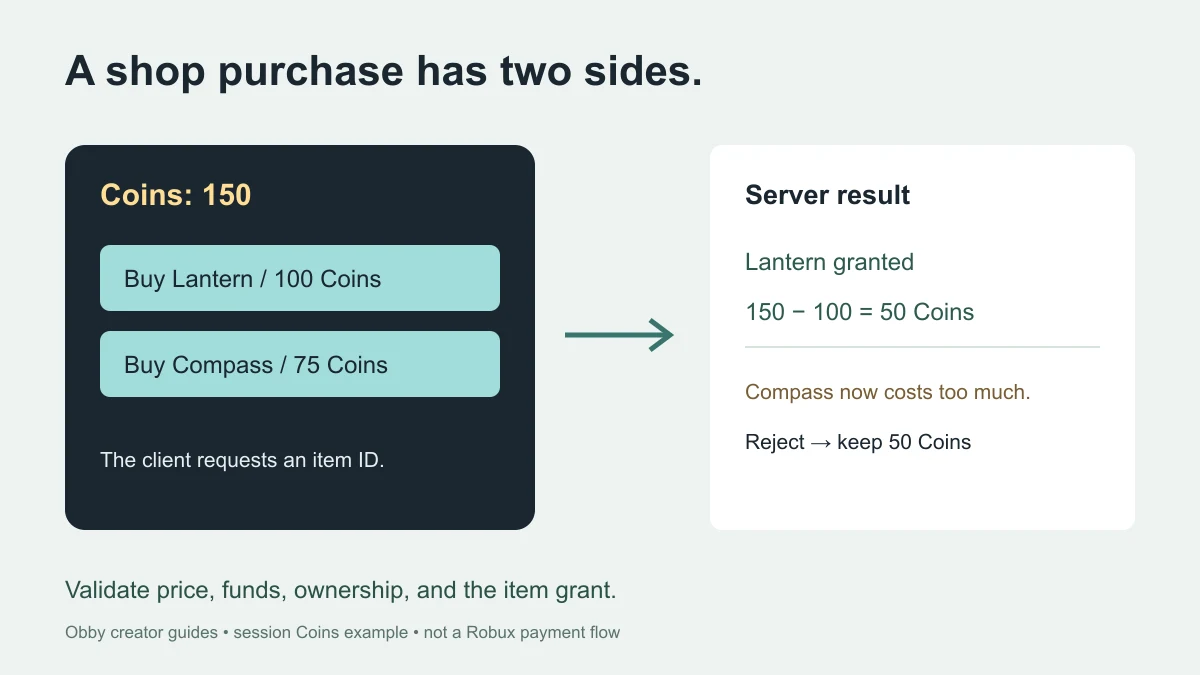
To make a shop in Roblox Studio, build the item list and purchase buttons on the client, then let the server check ownership, price, and available currency before granting an item. This worked example starts each player with 150 session Coins and offers a Lantern for 100 and a Compass for 75.
What you will build
The Shop button opens a small GUI. Its item buttons display server-provided prices and owned states. A successful purchase grants a nonphysical Tool to Backpack, deducts the server's known price, and marks the item owned for the current player session. The server restores owned practice Tools after character respawn without charging again.
Lantern and Compass are placeholder Tool names. They have no geometry, light, or navigation behavior. The example teaches the shop transaction and GUI; it does not create a finished equipment game, save purchases, award more Coins, or charge money.
For the broader AI-assisted architecture, see the shop system generator guide. For an equip/unequip panel, use the separate inventory system tutorial. These are independent practice examples, not plug-in modules that share one ownership database.
Set up the two scripts
- Use a spare place with a floor and a normal player character.
- Insert one regular Script in ServerScriptService and paste the server code.
- Insert one LocalScript in StarterPlayer → StarterPlayerScripts and paste the client code.
- Keep only one copy of this practice server Script. It reserves CoinShopPractice in ReplicatedStorage.
- Start a player playtest, open Shop, and compare the displayed prices with the expected 100 and 75 Coins.
Download the same code as server.lua and client.lua. Keep the server and client files in their stated locations.
The scripts passed syntax checks and 22 server-rule checks with mocked Roblox objects. They have not been executed in Studio for this guide. Use the test table below to verify actual GUI input, replication, and respawn behavior in your installed Studio.
Server Script: validate and commit one purchase
The catalog, balances, and ownership tables live on the server. The client requests an item ID rather than submitting a price or new balance. Reading the shop returns a fresh snapshot for display; changing that response on the client does not change the server profile.
-- Regular Script in ServerScriptService. Use a spare practice place.
-- Session Coins only: no Robux, purchases with money, or saved progress.
-- Documentation-reviewed; not executed in Studio for this guide.
local Players = game:GetService("Players")
local ReplicatedStorage = game:GetService("ReplicatedStorage")
local ServerStorage = game:GetService("ServerStorage")
assert(not ReplicatedStorage:FindFirstChild("CoinShopPractice"), "Use one shop server Script")
local remote = Instance.new("RemoteFunction")
remote.Name = "CoinShopPractice"
local catalog = {
    { id = "Lantern", price = 100 },
    { id = "Compass", price = 75 },
}
local byId, templates = {}, {}
for _, item in ipairs(catalog) do
    byId[item.id] = item
    local tool = Instance.new("Tool")
    tool.Name = item.id
    tool.RequiresHandle = false -- Nonphysical placeholder, no light/navigation behavior.
    tool.CanBeDropped = false
    tool:SetAttribute("CoinShopPracticeTool", true)
    tool.Parent = ServerStorage
    templates[item.id] = tool
end
local profiles, lastRequest, characterConnections = {}, {}, {}

local function snapshot(player, ok, message)
    local profile = profiles[player]
    if not profile then return { ok = false, message = "Session unavailable" } end
    local items = {}
    for _, item in ipairs(catalog) do
        table.insert(items, {
            id = item.id, price = item.price, owned = profile.owned[item.id] == true,
        })
    end
    return { ok = ok, message = message, coins = profile.coins, items = items }
end

local function giveTool(player, itemId)
    local backpack = player:FindFirstChildOfClass("Backpack")
    if not backpack then return false end
    local character = player.Character
    local existing = backpack:FindFirstChild(itemId)
        or (character and character:FindFirstChild(itemId))
    if existing then
        return existing:IsA("Tool") and existing:GetAttribute("CoinShopPracticeTool") == true
    end
    local tool = templates[itemId]:Clone()
    tool.Parent = backpack
    return true
end

local function setup(player)
    if profiles[player] or player.Parent ~= Players then return end
    profiles[player] = { coins = 150, owned = {} }
    characterConnections[player] = player.CharacterAdded:Connect(function(character)
        task.defer(function()
            local backpack = player:WaitForChild("Backpack", 10)
            if not backpack or player.Parent ~= Players or player.Character ~= character then return end
            local profile = profiles[player]
            if not profile then return end
            for itemId in pairs(profile.owned) do giveTool(player, itemId) end
        end)
    end)
end
Players.PlayerAdded:Connect(setup)
Players.PlayerRemoving:Connect(function(player)
    profiles[player], lastRequest[player] = nil, nil
    if characterConnections[player] then characterConnections[player]:Disconnect() end
    characterConnections[player] = nil
end)
for _, player in ipairs(Players:GetPlayers()) do setup(player) end

remote.OnServerInvoke = function(player, itemId)
    if player.Parent ~= Players or not profiles[player] then
        return { ok = false, message = "Session unavailable" }
    end
    if itemId == nil then return snapshot(player, true, "Choose an item") end
    local now = os.clock()
    if now - (lastRequest[player] or -math.huge) < 0.25 then
        return snapshot(player, false, "Please wait before trying again")
    end
    lastRequest[player] = now
    if typeof(itemId) ~= "string" or #itemId > 32 or not byId[itemId] then
        return snapshot(player, false, "Unknown item")
    end
    local profile, item = profiles[player], byId[itemId]
    if profile.owned[itemId] then return snapshot(player, false, "Already owned") end
    if profile.coins < item.price then return snapshot(player, false, "Not enough Coins") end
    local humanoid = player.Character and player.Character:FindFirstChildOfClass("Humanoid")
    if not humanoid or humanoid.Health <= 0 then
        return snapshot(player, false, "Wait for your character to be ready")
    end
    if not giveTool(player, itemId) then return snapshot(player, false, "Backpack is not ready or item name is in use") end
    -- No yielding operations between validation and these session-state updates.
    profile.coins = profile.coins - item.price
    profile.owned[itemId] = true
    return snapshot(player, true, "Purchased " .. itemId)
end
remote.Parent = ReplicatedStorage
Client LocalScript: display the shop and its result
The GUI gets a snapshot when opened. Buttons show Buy, a price in Coins, or Owned. A purchase response supplies the current balance and result message. The local busy flag avoids overlapping requests from this interface; the server independently limits purchase frequency.
-- LocalScript in StarterPlayer > StarterPlayerScripts.
-- Documentation-reviewed; not executed in Studio for this guide.
local Players = game:GetService("Players")
local ReplicatedStorage = game:GetService("ReplicatedStorage")
local player = Players.LocalPlayer
local remote = ReplicatedStorage:WaitForChild("CoinShopPractice")
local playerGui = player:WaitForChild("PlayerGui")
if playerGui:FindFirstChild("CoinShopPracticeGui") then return end
local gui = Instance.new("ScreenGui")
gui.Name = "CoinShopPracticeGui"
gui.ResetOnSpawn = false
local panel = Instance.new("Frame")
panel.Size = UDim2.new(0.85, 0, 0, 280)
panel.Position = UDim2.new(0.5, 0, 0.5, 0)
panel.AnchorPoint = Vector2.new(0.5, 0.5)
panel.BackgroundColor3 = Color3.fromRGB(26, 38, 48)
panel.Visible = false
panel.Parent = gui
local sizeLimit = Instance.new("UISizeConstraint")
sizeLimit.MaxSize = Vector2.new(400, 280)
sizeLimit.Parent = panel
local corner = Instance.new("UICorner")
corner.CornerRadius = UDim.new(0, 16)
corner.Parent = panel
local balance = Instance.new("TextLabel")
balance.Size = UDim2.new(1, -32, 0, 44)
balance.Position = UDim2.fromOffset(16, 8)
balance.BackgroundTransparency = 1
balance.Text = "Coins: loading"
balance.Font = Enum.Font.GothamBold
balance.TextSize = 22
balance.TextColor3 = Color3.fromRGB(255, 222, 148)
balance.Parent = panel
local status = Instance.new("TextLabel")
status.Size = UDim2.new(1, -32, 0, 64)
status.Position = UDim2.fromOffset(16, 198)
status.BackgroundTransparency = 1
status.TextWrapped = true
status.Font = Enum.Font.Gotham
status.TextSize = 16
status.TextColor3 = Color3.fromRGB(230, 238, 241)
status.Parent = panel
local toggle = Instance.new("TextButton")
toggle.Size = UDim2.fromOffset(160, 44)
toggle.Position = UDim2.new(0.5, 0, 1, -24)
toggle.AnchorPoint = Vector2.new(0.5, 1)
toggle.Text = "Shop"
toggle.Font = Enum.Font.GothamBold
toggle.TextSize = 18
toggle.BackgroundColor3 = Color3.fromRGB(255, 222, 148)
toggle.TextColor3 = Color3.fromRGB(26, 38, 48)
toggle.Parent = gui

local rows, busy = {}, false
local function render(response)
    balance.Text = "Coins: " .. response.coins
    status.Text = response.message
    for _, item in ipairs(response.items) do
        local button = rows[item.id]
        if button then
            button:SetAttribute("Owned", item.owned)
            button.Text = item.owned and (item.id .. " / Owned")
                or ("Buy " .. item.id .. " / " .. item.price .. " Coins")
            button.Active = not item.owned
            button.AutoButtonColor = not item.owned
        end
    end
end
local function send(itemId)
    if busy then return end
    busy = true
    status.Text = "Checking with server..."
    local success, response = pcall(function() return remote:InvokeServer(itemId) end)
    busy = false
    if success and type(response) == "table" and type(response.coins) == "number"
        and type(response.items) == "table" then
        render(response)
    else
        status.Text = "Shop unavailable. Close and reopen to retry."
    end
end
for index, itemId in ipairs({ "Lantern", "Compass" }) do
    local id = itemId
    local button = Instance.new("TextButton")
    button.Size = UDim2.new(1, -32, 0, 56)
    button.Position = UDim2.fromOffset(16, 62 + (index - 1) * 66)
    button.Text = id .. " / loading"
    button.Font = Enum.Font.GothamBold
    button.TextSize = 18
    button.BackgroundColor3 = Color3.fromRGB(161, 220, 218)
    button.TextColor3 = Color3.fromRGB(26, 38, 48)
    button.Parent = panel
    rows[id] = button
    button.Activated:Connect(function()
        if not button:GetAttribute("Owned") then send(id) end
    end)
end
toggle.Activated:Connect(function()
    panel.Visible = not panel.Visible
    toggle.Text = panel.Visible and "Close shop" or "Shop"
    if panel.Visible then send(nil) end
end)
gui.Parent = playerGui
Walk through the 150-Coin example
| Action | Balance | Ownership and result |
|---|---|---|
| Open Shop | 150 Coins | Neither item owned |
| Buy Lantern | 50 Coins | Lantern owned; Tool granted |
| Request Lantern again | 50 Coins | Already owned; no extra charge or Tool |
| Try Compass afterward | 50 Coins | Not enough Coins; no Compass grant |
| Respawn after buying Lantern | 50 Coins | Owned Lantern restored without charging |
| Leave and start a new session | 150 Coins | Fresh starter profile; no persistence |
As a separate fresh-player test, buy Compass first. The expected balance becomes 75 Coins, which is insufficient for Lantern. Do not combine observations from two player profiles when checking deductions.
Why the server owns the transaction
Roblox's client-server boundary guide requires validation of client-triggered state changes. Here, the server checks the player, bounded item ID, catalog, existing ownership, funds, character readiness, and Backpack. An unknown item or rejected grant leaves the balance unchanged.
The session update does not yield between the validated grant and ownership/balance changes. This keeps the small in-memory purchase flow together. It is not a claim of durable database transactions or protection for an unrelated system that also changes the same currency. Integrate one owner for your game's balances before extending the example.
The RemoteFunction reference covers the request/response mechanism. A UI animation or a local button click is not the purchase result. Use the returned server state to display success or rejection.
Verify the GUI and player lifecycle
- Open and close: Shop toggles the panel and becomes Close shop while open.
- Touch and desktop: each item button remains readable and reachable on the devices you intend to support.
- Success: compare the displayed balance, Owned label, and actual Tool in Backpack.
- Rejection: check that insufficient funds changes neither the balance nor item ownership.
- Rapid input: repeat a request inside the quarter-second server gate and confirm it does not purchase twice.
- Two players: buying on one client does not change the other player's profile.
- Respawn: confirm the panel survives and owned practice Tools return without a second deduction.
- Rejoin: confirm the practice profile starts fresh rather than implying a saved purchase.
Roblox documents GuiButton.Activated for button input. Test the actual target devices rather than assuming that a server test proves the panel layout or input path.
Troubleshoot the first failure
If Shop never appears, inspect the LocalScript location, PlayerGui, the replicated RemoteFunction, and Output errors. If the server Script reports a duplicate name, remove the extra practice copy in your spare place rather than bypassing the guard.
If a purchase is rejected as not ready, wait until the character and Backpack exist. If an item name is already used by an unrelated object, resolve that naming conflict before purchasing. The example avoids replacing that object or charging for a failed grant.
If the response is unavailable, the GUI asks you to close and reopen to retry. Do not turn that failure into an assumed successful purchase. During development, inspect both client and server Output to find the first error.
Keep Coins purchases separate from Robux
This example spends a server-managed practice number. It never prompts for Robux or processes a real payment. Roblox developer products have a separate receipt-processing workflow. Do not adapt this code into a Robux grant by treating a prompt close or GUI response as a verified receipt.
When you add saved currency, design loading, save failures, and session consistency before claiming purchases persist. Adding a data-store call after every click is not a substitute for that design. For a first complete shop, keep the session exercise isolated until each expected outcome is observed.
To turn the example into a larger Obby project, describe the earning loop, item catalog, ownership rule, purchase result, and intended controls. Test each new feature against the same success, rejection, retry, and respawn cases.
Documentation reviewed November 21, 2026.