Vector3.zero is the Roblox Vector3 value with X, Y, and Z all equal to zero. It is useful as a zero displacement or a deliberate fallback when no direction exists. A Vector3 can represent a position, size, or direction, so name the value by its meaning rather than assuming every vector is a point in the world.
Use Vector3.zero as a value, not a function
The Vector3 reference lists zero as a Vector3 property and new as a constructor. Write Vector3.zero without parentheses, or construct a vector with Vector3.new(x, y, z). Match the API’s capitalization: Vector3 is the type name, and zero is lower-case.
local noOffset = Vector3.zero
local sameComponents = Vector3.new(0, 0, 0)
print(noOffset == sameComponents) -- intended result: true
Zero does not mean “missing.” If a helper returns Vector3.zero, the caller receives a vector with zero components. Decide whether that is the right fallback for your task or whether the caller should handle a separate failure result.
Position and displacement answer different questions
| Name | Components | Meaning |
|---|---|---|
| startPoint | 2, 3, 1 | A point in the chosen coordinate space |
| targetPoint | 5, 3, 5 | The desired point in the same space |
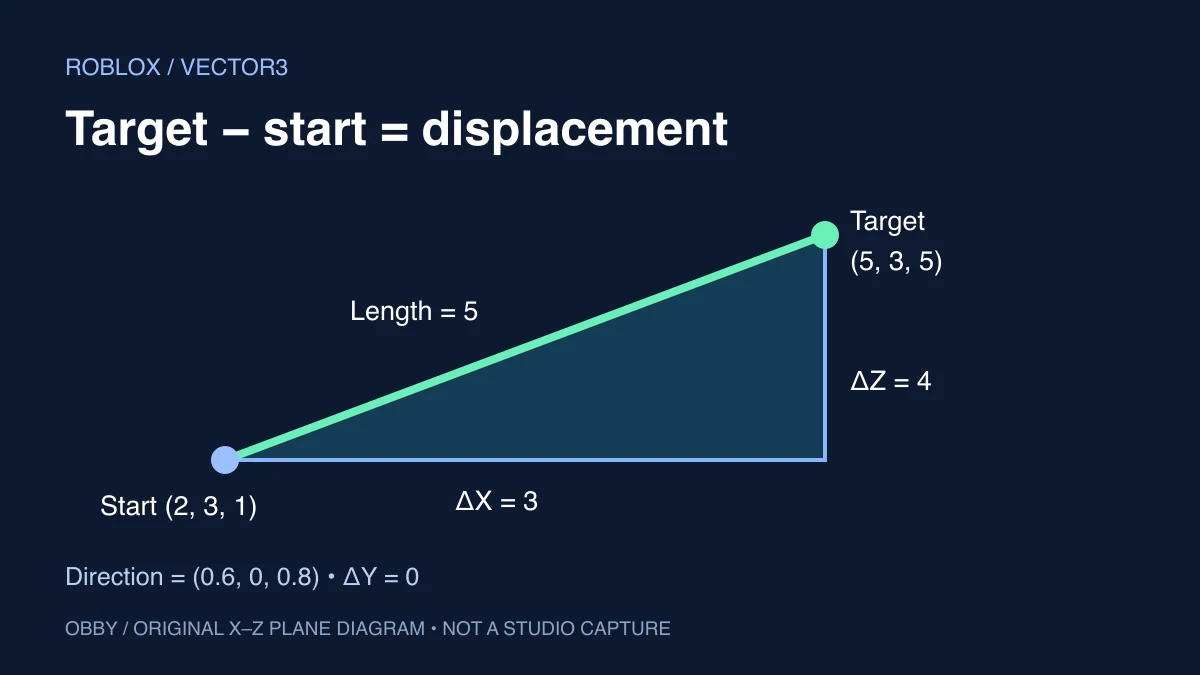
| targetPoint - startPoint | 3, 0, 4 | The displacement from start to target |
| Normalized displacement | 0.6, 0, 0.8 | Direction with length one |
Subtract in the order target minus start when you want a displacement toward the target. Reversing the subtraction reverses the direction. Adding a displacement to the start produces a new point; adding an absolute target point to the start usually answers a different question.
Run one complete Vector3 experiment
Insert a regular Script in ServerScriptService in a practice place, open Output, and run. This example uses only values and print statements. It does not need a named Part, create a moving object, or alter player data.
local function directionOrZero(displacement)
    local length = displacement.Magnitude
    if length <= 0.000001 then
        return Vector3.zero
    end
    return displacement / length
end

local startPoint = Vector3.new(2, 3, 1)
local targetPoint = Vector3.new(5, 3, 5)
local displacement = targetPoint - startPoint
local direction = directionOrZero(displacement)
local twoStudStep = direction * 2

print("Zero:", Vector3.zero)
print("Displacement:", displacement)
print("Distance:", displacement.Magnitude)
print("Direction:", direction)
print("After a two-stud step:", startPoint + twoStudStep)
print("Same-point direction:", directionOrZero(startPoint - startPoint))
The intended displacement is (3, 0, 4), with a distance of 5. Its direction is approximately (0.6, 0, 0.8), and the two-stud step ends at approximately (3.2, 3, 2.6). The same-point calculation returns (0, 0, 0). Floating-point display formatting can differ.
Those are mathematical predictions, not captured Studio output. The code has been documentation-reviewed but has not been executed here inside Studio. Stop and restart your test between changes, and compare one input change at a time.
Magnitude gives length; direction needs a nonzero length
The Vector3 reference exposes Magnitude and Unit. In this exercise, the length of (3, 0, 4) is the square root of 3² + 0² + 4², which is 5. Dividing each component by 5 produces a vector of length one.
A zero displacement has no unique direction. The helper checks its length before dividing, then deliberately returns Vector3.zero for a zero or very small displacement. The threshold is a design choice in this exercise, not a universal distance that every game should use.
If your action requires a real direction, treat the fallback as “do not move” rather than pretending it points toward something. In another system, retaining a previous valid direction may be more appropriate. Write that policy explicitly so a zero value does not accidentally hide an invalid setup.
Scale a direction to choose a distance
Multiplying the direction by 2 chooses a two-stud displacement in the example’s coordinate space. The starting point is then added once to find the new point. A direction alone does not contain the distance from start to target.
This arithmetic is not a complete movement controller. An instantaneous position change, a velocity, and a tween have different behavior. If you later build movement, specify whether your number means studs per step or studs per second and define how time is incorporated.
Also decide what should happen when the target is closer than the requested step. A fixed step can pass the target. A movement design may instead cap the step at the remaining distance, but that policy is separate from computing the direction.
Vector3 and CFrame are different types
Roblox’s CFrames guide describes CFrame as carrying position and rotation. A Vector3 position does not include that orientation. Use the CFrame guide when the task also involves facing, rotating, or converting between local and world space.
Before subtracting two values, check that they describe the same coordinate space. A local offset and a world position are not interchangeable just because both have three numeric components. Keep names such as localOffset and worldTarget while debugging.
Check these mistakes before changing the math
- Wrong capitalization: use Vector3.zero and Vector3.new as documented.
- Calling zero: zero is a value, not a constructor call.
- Reversed direction: inspect which point is subtracted from which.
- Zero-length normalization: decide on a fallback before dividing by length.
- Distance lost: a normalized direction has length one, not the original distance.
- Mixed spaces: establish whether each vector is local or world space.
- Unexpected movement: distinguish a position assignment from a velocity or time-based controller.
For spatial queries, continue with the raycasting guide, which uses a ray displacement whose length matters. For a visual transition, see TweenService. For reusable value helpers, the ModuleScript exercise shows how to expose a small API. Try your own coordinates in the Vector3 distance and direction calculator. Documentation checked November 8, 2026.