A Roblox ClickDetector receives pointer input on a 3D object. Add it under a Part and connect MouseClick to a function that receives the clicking Player. For a shared result, handle the action in a server Script and validate the interaction before changing game state.
Start with one clickable Part
Use a spare place with a floor and a player spawn near the origin. Insert a regular Script into ServerScriptService and paste the complete example below. It creates a small anchored Part named ClickPractice at position 0, 3, 0, with a ClickDetector underneath.
Start Play, walk close to the Part, and click it. An accepted action changes its shared color and prints the player’s name. This is a documentation-reviewed practice exercise; it has not been run in Studio for this guide.
-- Regular Script in ServerScriptService. Documentation-reviewed, not Studio-run.
local Players = game:GetService("Players")
local part = Instance.new("Part")
part.Name = "ClickPractice"
part.Size = Vector3.new(4, 2, 4)
part.Position = Vector3.new(0, 3, 0)
part.Anchored = true
part.Color = Color3.fromRGB(70, 130, 220)
part.Parent = workspace

local detector = Instance.new("ClickDetector")
detector.MaxActivationDistance = 12
detector.Parent = part
local lastAccepted = {}
local isGreen = false

detector.MouseClick:Connect(function(player)
    local character = player.Character
    local root = character and character:FindFirstChild("HumanoidRootPart")
    local humanoid = character and character:FindFirstChildOfClass("Humanoid")
    if not root or not root:IsA("BasePart") or not humanoid or humanoid.Health <= 0 then
        return
    end
    -- Explicit center-distance rule for this small, anchored practice Part.
    if (root.Position - part.Position).Magnitude > 12 then
        return
    end
    local now = os.clock()
    local previous = lastAccepted[player]
    if previous and now - previous < 0.75 then
        return
    end
    lastAccepted[player] = now
    isGreen = not isGreen
    part.Color = isGreen and Color3.fromRGB(60, 190, 120)
        or Color3.fromRGB(70, 130, 220)
    print(player.Name, "changed the practice color")
end)
Players.PlayerRemoving:Connect(function(player)
    lastAccepted[player] = nil
end)
Understand the event and its player argument
The ClickDetector API documents MouseClick and its Player argument. Use the current capitalized event name. Touch input also produces click events, and default gamepad controls provide an activation path, so test the input devices your experience supports.
The example uses a server Script rather than placing a LocalScript beneath an ordinary Workspace Part. If you need client-specific visuals, choose a suitable client script location and keep that visual layer separate from the server’s decision.
Keep display range separate from authorization
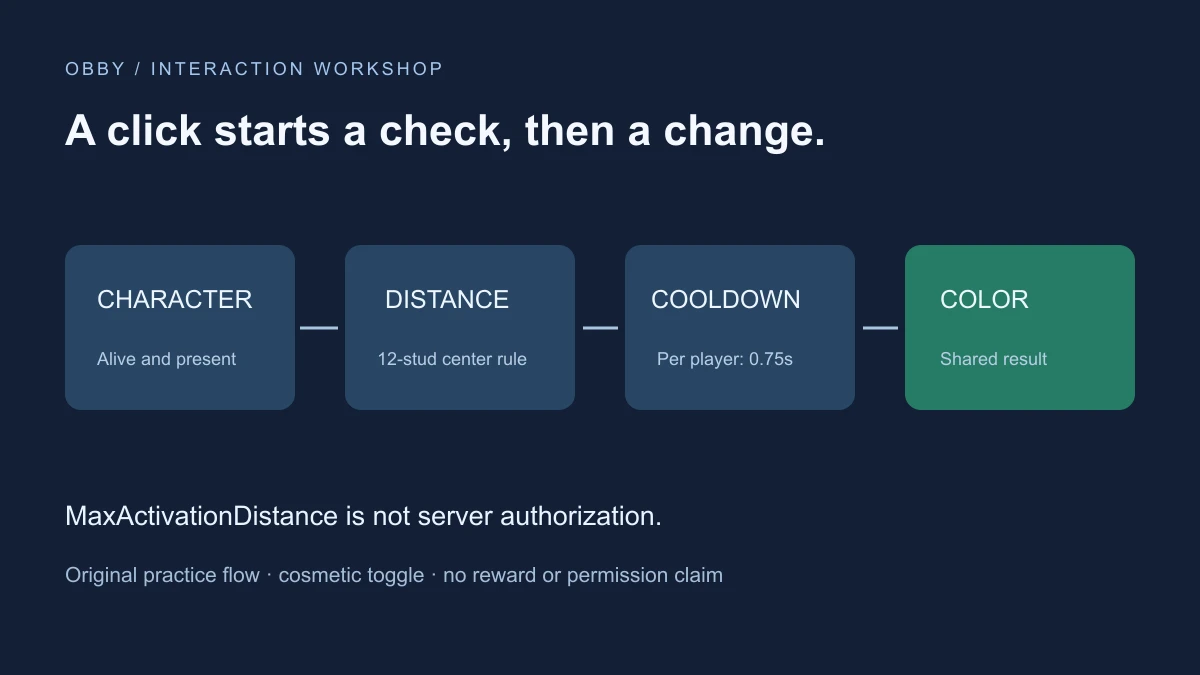
MaxActivationDistance controls ordinary click availability, but it is not a substitute for server validation. Roblox’s client-server security guide states that ClickDetector events have no built-in server checks. The sample independently checks the living character, distance, and time since the player’s last accepted action.
The twelve-stud rule measures from HumanoidRootPart to the practice Part’s center. That is a deliberate rule for this small object, not a general surface-distance calculation for large models. It does not check line of sight or a quest permission. Add the rules your intended action actually needs before using the pattern for anything valuable.
The Part is anchored, which also keeps its target position stable for the exercise. Do not assume that distance checking alone protects a critical interaction on an object a client can move through network ownership.
Run a short acceptance test
| Test | Action | Expected observation |
|---|---|---|
| Nearby action | Click while close and alive | Color toggles and server Output names the player |
| Repeated input | Click rapidly | Accepted changes are limited per player |
| Outside range | Walk away and try again | No accepted color change through normal input |
| Shared state | Use a two-player test | Both players observe the shared Part color |
The normal out-of-range test demonstrates ordinary behavior; it is not a simulation of a modified client. Review the explicit server checks separately. A visible result and a security review answer different questions.
Know what the cooldown limits
Each player has a last-accepted timestamp. Two different players can therefore each trigger a change close together, and the shared color may toggle twice. If your design needs one global interaction lock, use a separate shared rule rather than describing this per-player limit as global.
The handler does not yield before updating its state. PlayerRemoving clears the stored timestamp. This small color toggle is not an inventory, purchase, or reward transaction; those systems require their own validation and persistence behavior.
Troubleshoot missing clicks
- No Part: inspect Script placement and Output errors.
- Part appears but nothing happens: walk closer and inspect the detector beneath the intended object.
- A nested object receives input: inspect overlapping or nested detectors and their input priority.
- Clicks appear inconsistent: check input bindings that may take priority and the server cooldown.
- LocalScript does not run: review its execution location rather than putting it under an ordinary Workspace detector.
For a visible action label and hold interaction, compare the ProximityPrompt guide. For reusable rate-control ideas, see the debounce guide. Documentation reviewed November 17, 2026.