To protect your scripts in Roblox Studio, keep private game rules on the server, assume code sent to a player can be inspected, and validate every request that changes authoritative game state. Obfuscation is not a confidentiality boundary. Start by identifying what must remain private and which scripts actually reach clients.
Separate three protection questions
A useful review starts with one concrete feature. Ask whether you are protecting private implementation, preventing an unauthorized game action, or controlling who can edit the project. Each needs its own evidence. A hidden file name does not answer all three.
| Question | Review focus | Evidence to record |
|---|---|---|
| Can players inspect this code? | Replication and script placement | Actual container, execution context and dependencies |
| Can a request change something it should not? | Server validation | Normal and rejected request outcomes |
| Who can alter the source project? | Collaborator access and dependency review | Named editor roles and reviewed changes |
Keep private logic out of replicated modules
Roblox’s access-control and confidentiality guide explains that replicated client scripts and modules can be decompiled, including code that never runs on that client. A disabled script or a module’s unused branch is not a reliable place for private logic.
Separate a shared display module from a private rules module. A RunService:IsServer() branch inside a replicated ModuleScript does not make the rest of that file confidential. Move the private implementation into a server-only location instead of trying to hide it inside the shared file.
This protects against player-client inspection of non-replicated code. It does not promise secrecy from people who already have source-project access.
Choose a server-only home deliberately
ServerScriptService keeps its contents from replicating to player clients and is intended for server scripts and modules. ServerStorage can hold server-side modules and other assets, but ordinary Scripts do not start running there. Moving a file can therefore change behavior as well as visibility.
Keep an inventory of callers before moving a module. Update the references in a practice copy, then test the feature that required it. Our ModuleScript guide covers require and returned interfaces; the official script types and locations guide covers execution placement.
For a review example, split ShopDisplay from ShopRules. The first can describe what the interface shows; the second owns the purchase decision. That is a proposed organization exercise, not a tested shop implementation or a reason to move every file blindly.
Validate actions on the server
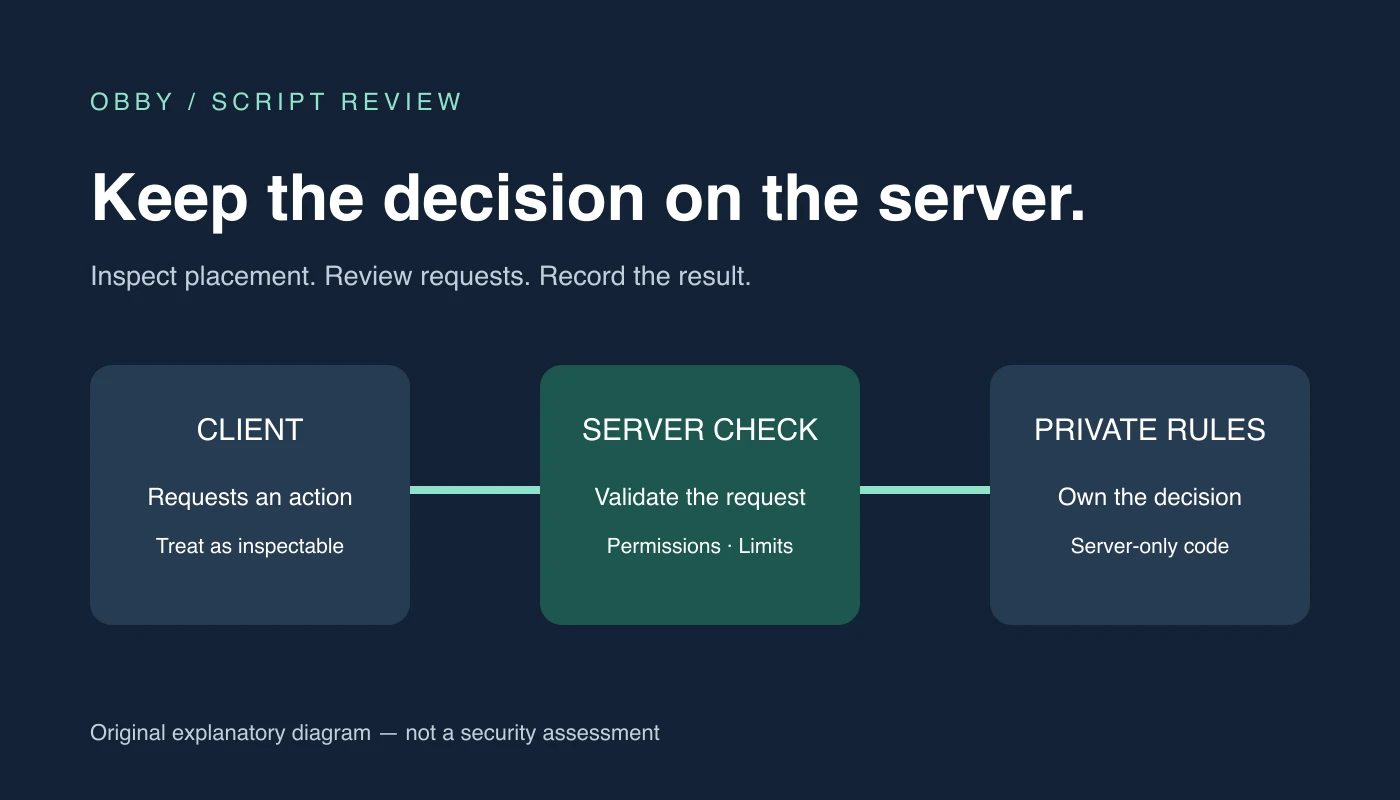
Private source alone cannot make a remotely triggered action safe. Roblox’s client-server boundary guide calls for checking client inputs and their context on the server. Review permitted actions, input types, sizes, values and relevant player permissions. Apply server rate limits to requests that can be repeated.
For example, a client can request a catalog choice. The server should determine the price and whether the caller can receive it, rather than treating client-supplied price or recipient claims as authority. The display text and the decision rule have different jobs.
Use our RemoteEvent request-and-reply exercise to study the messaging boundary with harmless practice state. For your own feature, write down one valid request, one disallowed choice and one excessive-repeat case before testing. Record actual outcomes rather than marking a feature secure because the happy path worked.
Keep credentials out of source files
Use Roblox’s secrets store for supported external-service credentials instead of embedding their values in code. Server scripts access named secrets through HttpService:GetSecret. Production secrets and local test secrets have distinct setup requirements; use the current official instructions for the environment you are testing.
Record only a credential’s reference name in review notes. If a credential was exposed, moving the file afterward does not revoke the old value; replace it through the issuing service and review its usage. Do not put live keys into screenshots, prompts or this downloadable worksheet.
What obfuscation and unusual names cannot prove
Renaming files or making source harder to read does not stop a client from receiving code that the project replicates to it. Do not use an obfuscator’s marketing claim as evidence that a secret can safely live in a LocalScript. It also makes your own debugging and review harder when the transformed output is difficult to inspect.
Review collaborators and imported dependencies separately. Write down which people can edit the project and what a plugin or imported model contributes. Follow our plugin management guide for the existing plugin workflow rather than installing a “protection” tool just to complete this checklist.
Download a script review worksheet
Download the plain-text script review worksheet. It gives you fields for placement, callers, server checks, dependencies and observed test results. It executes nothing, reads no project files and is not a security scanner.
- Choose one feature and list its scripts and modules.
- Mark the code that reaches clients and the rules that must remain private.
- Trace one request to the server decision that handles it.
- Write the expected normal and rejected outcomes.
- Test in a spare place, record the observed result and keep unresolved questions visible.
When prototyping with Obby, request a small feature with a clear server-owned decision, then inspect the generated code and placement in Studio. Generation is a starting point for review, not proof of a secure finished experience.
Sources and limits
Official Roblox documentation was reviewed November 25, 2026. The diagram, worksheet and review examples are original learning aids. No native Studio security assessment, exploit-resistance test or whole-project audit was performed for this article.