To make a lobby system in Roblox Studio, give one server controller ownership of the waiting, countdown, round and return sequence. Start with a lobby and arena in the same place so you can inspect the round rules before adding cross-place travel. The two-file practice starter below provides that timed loop.
What this starter does
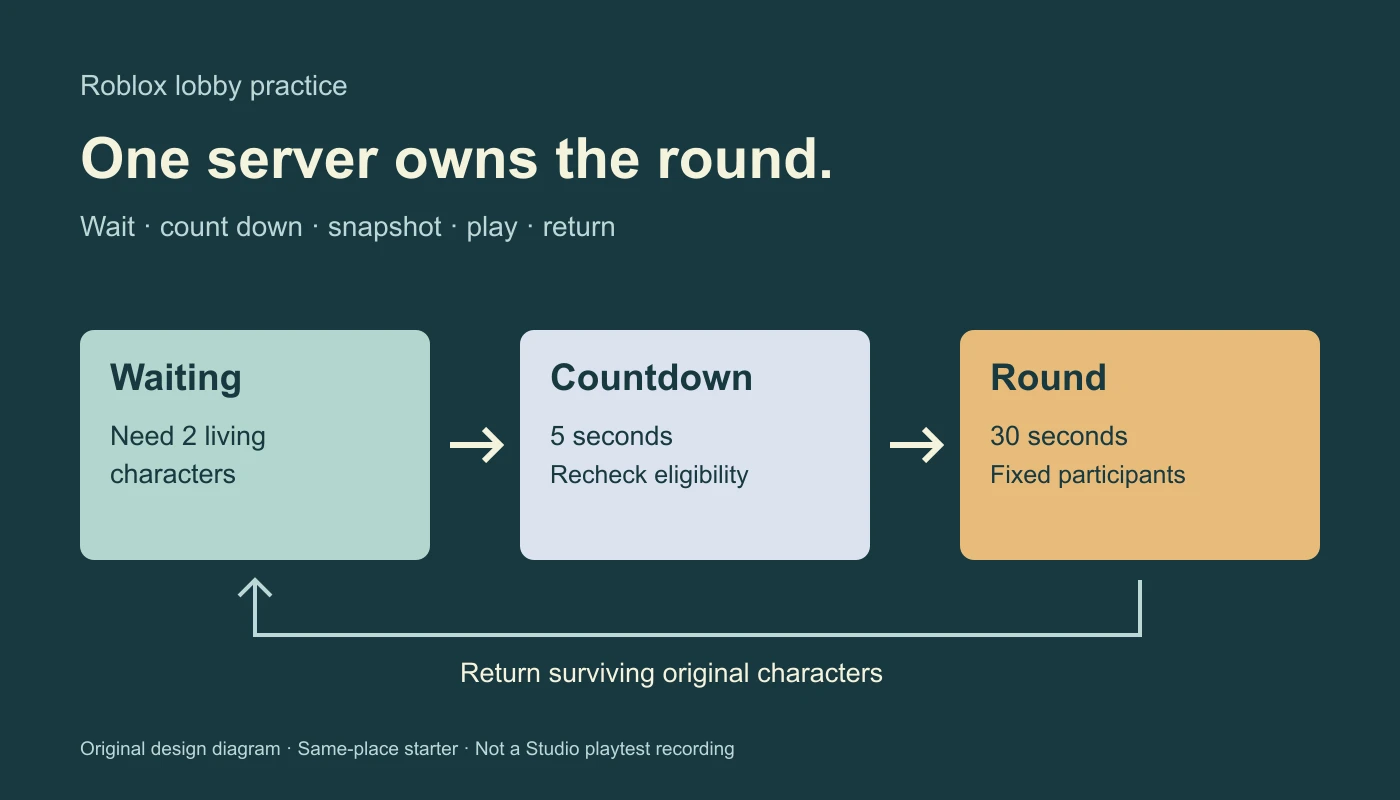
The server creates a teal lobby spawn and an amber arena floor in a fresh practice place. Two living characters start a five-second countdown. At the deadline, the current eligible characters become the round's participant snapshot and are moved to the arena. The round lasts 30 seconds, then surviving original characters are moved back.
- A player leaving or losing their living character can cancel the countdown if the eligible count falls below two.
- A player joining during an active round is not automatically moved into that round.
- Dead or reset characters respawn at the lobby; replacement characters are not moved back as if they were the original participants.
- The timer continues even if all participants leave or die. This starter has no winner, elimination scoring or reward logic.
The two pads are an open practice layout, not access-controlled spaces. Players can walk between them. The snapshot controls this script's automatic movements; it is not a barrier or a completed game-rule system.
Create the two scripts in a practice place
- Open a new baseplate practice place and save a copy. Keep the area near the origin and 80 studs along the X axis clear.
- In ServerScriptService, create a ModuleScript named LobbyRound. Paste the first file below.
- Beside it, create a Script named LobbyServer. Set its RunContext to Server and paste the second file.
- Keep one LobbyServer instance. It creates Workspace → ObbyLobbyPractice → LobbySpawn and ArenaFloor at runtime.
- Run a two-client test and inspect the folder's Phase and SecondsRemaining attributes as the sequence advances.
Roblox's script locations guide explains the difference between Script, LocalScript and ModuleScript and recommends a server entry point in ServerScriptService. A LocalScript is not a replacement for the server controller in this setup.
Download the exact source files: LobbyRound.lua and LobbyServer.lua. Copy each into the corresponding script type; downloading a file does not install or run it in Studio.
ModuleScript: LobbyRound
This module advances only when the server calls step. It takes a timestamp and eligible player IDs, returns a start or return action once, and keeps the participant snapshot separate from later arrivals.
Show the complete LobbyRound module
-- ModuleScript: ServerScriptService/LobbyRound
-- Pure transition logic. No Roblox services, UI, rewards or matchmaking.
local LobbyRound = {}
LobbyRound.__index = LobbyRound
local function finite(n)
    return type(n) == "number" and n == n and n > -math.huge and n < math.huge
end
function LobbyRound.new(minPlayers, countdownSeconds, roundSeconds)
    assert(finite(minPlayers) and minPlayers >= 1 and minPlayers % 1 == 0, "Invalid minimum")
    assert(finite(countdownSeconds) and countdownSeconds > 0, "Invalid countdown")
    assert(finite(roundSeconds) and roundSeconds > 0, "Invalid round duration")
    return setmetatable({phase = "Waiting", minPlayers = minPlayers,
        countdownSeconds = countdownSeconds, roundSeconds = roundSeconds,
        participants = {}, deadline = nil, lastTime = nil}, LobbyRound)
end
function LobbyRound:step(now, readyIds)
    assert(finite(now) and (self.lastTime == nil or now >= self.lastTime), "Clock must not move backwards")
    self.lastTime = now
    local ids, seen = {}, {}
    for _, id in ipairs(readyIds) do
        assert(finite(id) and id % 1 == 0, "Expected integer player IDs")
        if not seen[id] then
            seen[id] = true
            table.insert(ids, id)
        end
    end
    table.sort(ids)
    local result = {}
    if self.phase == "Waiting" then
        if #ids >= self.minPlayers then
            self.phase = "Countdown"
            self.deadline = now + self.countdownSeconds
        end
    elseif self.phase == "Countdown" then
        if #ids < self.minPlayers then
            self.phase, self.deadline = "Waiting", nil
        elseif now >= self.deadline then
            self.phase = "Round"
            self.deadline = now + self.roundSeconds
            self.participants = ids
            result.startIds = table.clone(ids)
        end
    elseif self.phase == "Round" and now >= self.deadline then
        result.returnIds = table.clone(self.participants)
        self.phase, self.deadline, self.participants = "Waiting", nil, {}
    end
    result.phase = self.phase
    result.remaining = self.deadline and math.max(0, math.ceil(self.deadline - now)) or 0
    return result
end
return LobbyRound
Server Script: LobbyServer
This file creates the practice pads, sets the lobby respawn target, gathers living characters and performs the movement actions. It checks character identity before returning a participant so a respawned replacement is not mistaken for the character that entered the arena.
Show the complete LobbyServer script
-- Script: ServerScriptService/LobbyServer, RunContext = Server
-- Use a fresh practice place. Creates pads near (0, 0, 0) and (80, 0, 0).
-- Put the companion ModuleScript LobbyRound beside this Script.
local Players = game:GetService("Players")
local Workspace = game:GetService("Workspace")
local LobbyRound = require(script.Parent:WaitForChild("LobbyRound"))
assert(not Workspace:FindFirstChild("ObbyLobbyPractice"), "Remove the duplicate lobby Script before retrying")
local world = Instance.new("Folder")
world.Name = "ObbyLobbyPractice"
world.Parent = Workspace
local function pad(className, name, position, size, color)
    local part = Instance.new(className)
    part.Name, part.Position, part.Size = name, position, size
    part.Anchored = true
    part.Color = color
    part.Parent = world
    return part
end
local lobby = pad("SpawnLocation", "LobbySpawn", Vector3.new(0, 1, 0),
    Vector3.new(40, 2, 40), Color3.fromRGB(70, 150, 160))
lobby.Neutral = true
lobby.AllowTeamChangeOnTouch = false
local arena = pad("Part", "ArenaFloor", Vector3.new(80, 1, 0),
    Vector3.new(40, 2, 40), Color3.fromRGB(210, 140, 65))
local function register(player)
    player.RespawnLocation = lobby
end
Players.PlayerAdded:Connect(register)
for _, player in ipairs(Players:GetPlayers()) do register(player) end
local function livingCharacter(player)
    local character = player.Character
    if not character or not character.Parent then return nil end
    local humanoid = character:FindFirstChildOfClass("Humanoid")
    if not humanoid or humanoid.Health <= 0 or not character:FindFirstChild("HumanoidRootPart") then return nil end
    return character
end
local function move(character, floor, slot, count)
    -- Distribute pivots in a grid over the 40-stud pad, with a margin.
    local columns = math.ceil(math.sqrt(count))
    local rows = math.ceil(count / columns)
    local x = ((slot - 1) % columns + 0.5) * (32 / columns) - 16
    local z = (math.floor((slot - 1) / columns) + 0.5) * (32 / rows) - 16
    character:PivotTo(floor.CFrame * CFrame.new(x, 5, z))
    local root = character:FindFirstChild("HumanoidRootPart")
    if root then
        root.AssemblyLinearVelocity = Vector3.zero
        root.AssemblyAngularVelocity = Vector3.zero
    end
end
local controller = LobbyRound.new(2, 5, 30)
local roundCharacters = {}
while true do
    local readyIds, readyCharacters = {}, {}
    for _, player in ipairs(Players:GetPlayers()) do
        local character = livingCharacter(player)
        if character then
            table.insert(readyIds, player.UserId)
            readyCharacters[player.UserId] = character
        end
    end
    local update = controller:step(os.clock(), readyIds)
    if update.startIds then
        roundCharacters = {}
        for slot, id in ipairs(update.startIds) do
            local character = readyCharacters[id]
            roundCharacters[id] = character
            move(character, arena, slot, #update.startIds)
        end
    elseif update.returnIds then
        for slot, id in ipairs(update.returnIds) do
            local player = Players:GetPlayerByUserId(id)
            local character = player and livingCharacter(player)
            -- Never move a replacement character or a late joiner as an old participant.
            if character and character == roundCharacters[id] then
                move(character, lobby, slot, #update.returnIds)
            end
        end
        roundCharacters = {}
    end
    world:SetAttribute("Phase", update.phase)
    world:SetAttribute("SecondsRemaining", update.remaining)
    task.wait(0.25)
end
Understand the timing and respawn policy
The server uses os.clock() to compare deadlines. Its short wait controls how often it checks state; it does not guarantee frame-accurate transitions. A delayed update starts a full round rather than pretending the round began before characters were moved.
Roblox's RespawnLocation reference requires a Workspace SpawnLocation with an appropriate team match or Neutral enabled. This starter creates a neutral lobby spawn. PivotTo moves a model to the requested CFrame; setting a future respawn target and moving an existing character are separate operations.
For deeper spawn configuration, use the spawn-location guide. Before combining this starter with another game, identify other scripts that move characters or change RespawnLocation. Competing controllers can obscure which rule produced the observed position.
Test the cases that break simple lobby loops
| Scenario | Expected policy |
|---|---|
| Only one living character | Remain Waiting |
| Second living character arrives | Begin the five-second countdown |
| Eligible count drops below two during countdown | Cancel; a later countdown starts from five again |
| Player joins during Round | No automatic arena movement for that round |
| Participant dies and respawns | Respawn in lobby; do not move the replacement on return |
| Round deadline passes | Return surviving original characters once |
Use the multiplayer testing guide to compare the server and client views. Check actual spawn positions, movement, floor contact and resets. The unit tests below do not prove those engine behaviors.
When the lobby needs a different place or server
This starter uses same-place character movement. For a separate match place or server, Roblox documents server-side TeleportAsync, destination access controls and teleport failure handling. A call starting successfully is not proof that every player arrived. Define how a failed transfer returns a player to a usable queue state.
Current documentation supports TeleportAsync in Studio Test and Team Test modes, with limitations including same-experience destinations and differences in server identifiers. Check those current conditions before extending the practice loop. The downloadable files here do not implement cross-place travel or reserved servers.
Turn the practice layout into a game brief
Try an original brief in Obby: “Create a compact arena lobby with a safe spawn, an obvious waiting area and a clearly marked arena entrance. Keep decorations away from the movement route and leave room for status text.” Inspect the generated project, then integrate and test one round controller. A visual lobby alone does not implement its rules.
For atmosphere after the round loop is working, follow the background-music setup guide.
What was validated
Both downloadable files passed the official Luau compiler. The actual LobbyRound module passed 25 CLI transition checks covering cancellation at the deadline, participant snapshots, duplicate IDs, late arrivals, one-time return actions and invalid clocks or settings. No native Studio playtest, physics, respawn, networking or published-game test was performed. Treat the server adapter as a practice starter to test in your own place, not a production-ready matchmaking system. Sources reviewed November 25, 2026.