Tycoons Are Roblox's Most Profitable Genre
Tycoon games consistently generate the most revenue on Roblox. The addictive progression loop — earn, spend, upgrade, repeat — keeps players coming back and spending Robux. This guide teaches you how to make a tycoon game from scratch.
The Core Tycoon Loop
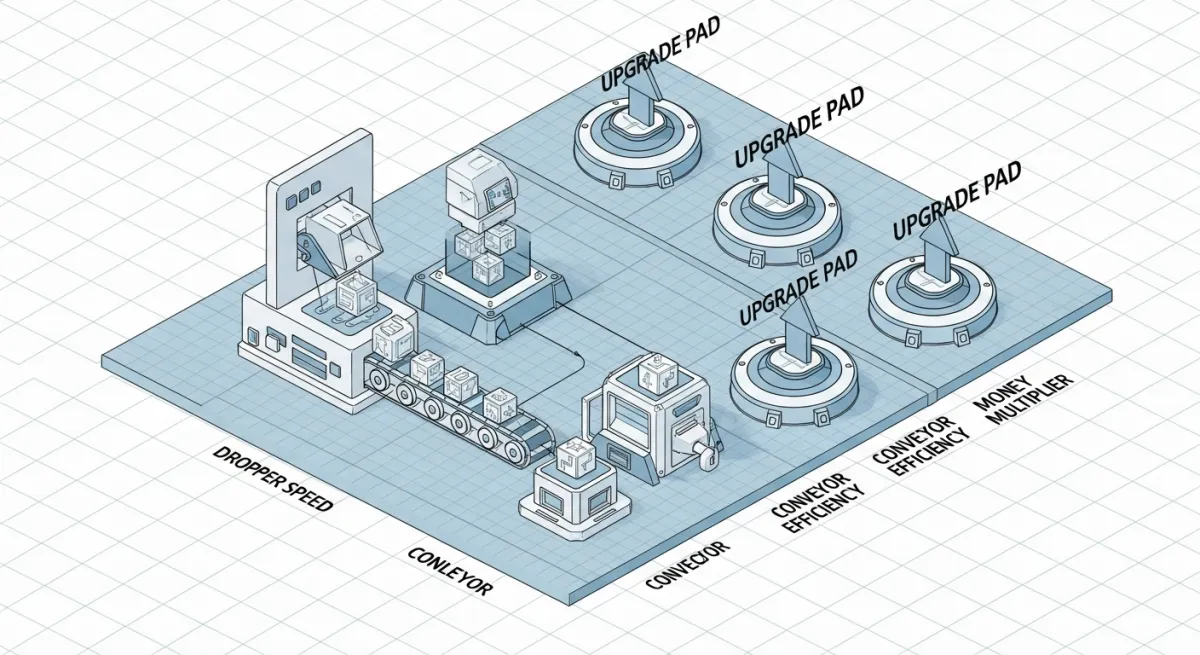
Every successful tycoon follows this pattern:
- Claim — player steps on a pad to claim their tycoon plot
- Earn — a dropper generates items that convert to cash
- Spend — player buys upgrades by stepping on purchase pads
- Expand — upgrades unlock new areas, better droppers, and decorations
- Rebirth — reset progress for permanent multipliers (optional but recommended)
Step 1: Build the Tycoon Plot
Create the physical layout in Roblox Studio:
- Base plate — the foundation of the player's tycoon (usually 50x50 studs)
- Claim button — a Part with a "Click to Claim" SurfaceGui
- Dropper area — where items spawn and fall onto a conveyor
- Collector — the part that converts dropped items into cash
- Purchase pads — buttons that unlock upgrades when stepped on
Step 2: Script the Dropper System
The dropper is the heart of any tycoon. Here's a basic dropper script:
local dropper = script.Parent
local dropPart = dropper:FindFirstChild("DropPart")
local INTERVAL = 2 -- seconds between drops
local VALUE = 5 -- cash per drop

while true do
  task.wait(INTERVAL)
  local item = Instance.new("Part")
  item.Size = Vector3.new(1, 1, 1)
  item.Position = dropPart.Position
  item.BrickColor = BrickColor.new("Bright yellow")
  item.Parent = workspace
  -- Tag with value for collector
  item:SetAttribute("Value", VALUE)
  -- Auto-cleanup after 30 seconds
  game.Debris:AddItem(item, 30)
end
Step 3: Script the Collector
The collector detects dropped items and adds their value to the player's cash:
local collector = script.Parent
local owner = nil -- set when player claims tycoon

collector.Touched:Connect(function(hit)
  local value = hit:GetAttribute("Value")
  if value and owner then
    local leaderstats = owner:FindFirstChild("leaderstats")
    if leaderstats then
      leaderstats.Cash.Value = leaderstats.Cash.Value + value
    end
    hit:Destroy()
  end
end)
Step 4: Create Purchase Pads
Purchase pads unlock upgrades when the player has enough cash and steps on them:
local pad = script.Parent
local COST = 100
local unlockModel = pad:FindFirstChild("UnlockModel")
local purchased = false

pad.Touched:Connect(function(hit)
  if purchased then return end
  local player = game.Players:GetPlayerFromCharacter(hit.Parent)
  if not player then return end
  local cash = player.leaderstats.Cash
  if cash.Value >= COST then
    cash.Value = cash.Value - COST
    purchased = true
    if unlockModel then
      unlockModel.Parent = workspace
    end
    pad:Destroy()
  end
end)
Step 5: Add Rebirth System
Rebirth resets the player's tycoon but gives a permanent cash multiplier. This keeps players engaged long-term:
- Set a rebirth cost (e.g., $1,000,000)
- Track rebirth count in DataStore
- Apply multiplier: cash earned × (1 + rebirths × 0.5)
- Reset the physical tycoon to its initial state
Step 6: Monetize with Game Passes
Tycoon game passes that sell well:
- 2x Cash — doubles all income (most popular)
- Auto-Collect — automatically collects dropped items
- VIP Area — exclusive upgrades and decorations
- Faster Droppers — reduce dropper interval
- Skip Stage — instantly unlock the next upgrade
The Fast Track: AI-Generated Tycoons
Building all these systems from scratch takes hours of scripting. Obby can generate a complete tycoon game from a description: "A pizza restaurant tycoon with droppers, upgrades, a rebirth system, and VIP game pass." You get a working .rbxlx in minutes.